
65-inch touch screen smart whiteboard: New technology that changes collaboration
author: toruitech
2025-06-14

The rapid development of technology is constantly changing the way we work, learn and live. When it comes to education, corporate collaboration or creative content display, a powerful tool can stimulate productivity and innovation. The 65-inch touch screen smart whiteboard has become a popular choice in the current market with its modern design and powerful interactive functions. This article will explore how this technology product completely defines the collaborative experience from the aspects of product features, application scenarios, advantages and future development trends.
1. What is a 65-inch touch screen smart whiteboard?
A 65-inch touch screen smart whiteboard is a device with interactive display and touch operation functions, which integrates the functions of traditional whiteboards, touch screens, TVs and computers. At its core is a 65-inch large screen, relying on high-resolution display technology (usually 4K UHD) and multi-touch functions, users can use their fingers or stylus to operate, such as writing, drawing, marking, etc. Many smart whiteboards are also equipped with Android or Windows operating systems, which can run various applications, such as video conferencing software, teaching tools and file management.
2. Features and functions
High-definition screen and excellent display effect
Modern users are pursuing higher and higher display effects, and touch screen smart whiteboards meet this demand with their high-resolution screens and color accuracy. Whether it is displaying business data charts or playing high-definition teaching videos, the pictures can be presented clearly and vividly, which significantly improves the visual experience.
Multi-touch and smooth interaction
Touch screen smart whiteboards support multi-touch function, which means that multiple people can operate on the screen at the same time. For example, when working in a team, members can draw or mark opinions at the same time, solving the problem of narrow writing space on traditional whiteboards and truly realizing real-time interaction.
Built-in operating system and multi-function expansion
Many smart whiteboards are equipped with Android or Windows operating systems and can run various applications, which greatly expands the functions of the device. For example, you can install the Office suite for document editing, or you can conduct video conferences through Zoom or Teams. In addition, whiteboards often have built-in wireless screen sharing functions, which support wireless projection of mobile phones, computers and tablet devices, making it convenient for multiple devices to connect.
High durability and environmentally friendly design
Compared with traditional paper whiteboards or projection equipment, touch screen smart whiteboards use tempered glass and a sturdy shell, which has a longer service life. In addition, since it does not require the use of any consumables (such as whiteboard pens or erasers), it is also more environmentally friendly.
Convenient operation and intuitive design
The operation interface is usually designed to be very user-friendly, without complicated learning costs. Whether teachers, entrepreneurs or students can quickly get started and complete tasks easily.
3. Application scenarios
Education field
In the field of education, the 65-inch touch screen smart whiteboard provides teachers and students with a new interactive teaching platform. Teachers can use a stylus to directly annotate courseware on the screen, show scientific experiment videos, or draw in real time. Not only that, the whiteboard also allows students to participate in interactions, such as answering questions or completing classroom games. Its functions not only increase classroom participation, but also make teaching effects more intuitive.
Enterprise meetings and collaboration
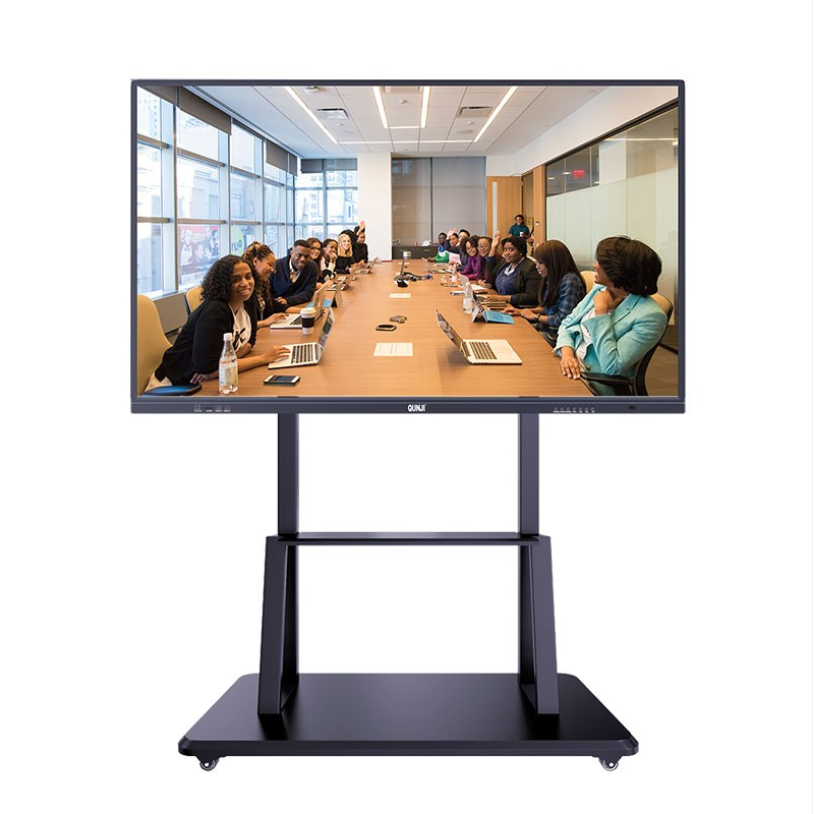
For enterprises, this smart whiteboard is a magic weapon in the conference room. It can replace projectors and traditional whiteboards, while completing data display, brainstorming and team planning. For example, in a strategic meeting, the team can edit pictures or tables on the whiteboard at the same time to record the discussion. Combined with the efficient video conferencing function, it can achieve smoother remote conference communication.
Medical and design industry
In the medical field, the 65-inch touch screen smart whiteboard can be used to display patient physical examination reports, and doctors and nurses can discuss medical records together. In the architecture and interior design industry, static whiteboards can no longer meet the designer's needs for creative drawing. Smart whiteboards can support design teams to draw plans and adjust details in real time, so as to quickly meet customer needs.
Public places and exhibitions
In retail stores and corporate exhibitions, smart whiteboards can be used as information display screens or interactive advertising tools. Customers can not only obtain product information, but also interact with the brand directly through the screen, which improves the customer experience.
4. Advantages of 65-inch touch screen smart whiteboard
Improve efficiency and save time
Traditional meeting tools often require multiple devices to cooperate, while smart whiteboards integrate writing, display and remote communication functions to simplify the operation process. This allows users to focus on the task itself rather than technical issues.
High compatibility
Modern smart whiteboards usually support multiple file formats, such as PDF, PPT, pictures and videos. This compatibility makes it easy to apply to different scenarios, from classroom teaching to business reports.
Environmental protection and sustainability
By reducing the use of traditional paper whiteboards, this smart device effectively reduces resource waste and reduces the purchase cost of consumables such as whiteboard pens. After long-term use, users can not only save money, but also contribute to environmental protection.
Improve interactivity
Compared with static traditional whiteboards or ordinary displays, the interactive design of touch screen smart whiteboards can effectively attract user participation, and people are more willing to interact with it. This is particularly critical in the fields of education and marketing.
V. Future development trends
With the advancement of artificial intelligence and Internet of Things technology, future touch screen smart whiteboards will be more intelligent. For example, through AI algorithms, it can automatically identify user habits and optimize writing and operation experience. In addition, it may support voice commands, allowing users to complete certain operations without even touching the screen. Interconnection will become the core of development. In the future, devices will not only support all types of smart product docking, but also be applicable to more industry needs.
VI. Conclusion
The 65-inch touch screen smart whiteboard is a revolutionary tool for modern collaboration and interaction, opening up a new work and education model. Whether it is an efficient meeting in a company, a smart classroom in a school, or a creative process in the design industry, the smart whiteboard has demonstrated its strong adaptability and superiority. As technology continues to advance, this device will become more intelligent, convenient and indispensable. In an era of pursuing efficiency and innovation, we will surely see touch screen smart whiteboards play a role in more fields, bringing greater changes to people's learning and work.
How to Use a Smart Board Interactive Whiteboard: A Step-by-Step Guide
smart interactive whiteboard: technical parameters and functions
Related Article

Choosing the right interactive whiteboard size is an important decision for distributors, wholesalers, and education technology suppliers. The 65-inch, 75-inch, and 86-inch interactive whiteboards are popular options for classrooms, meeting rooms, training centers, and commercial projects.
65 vs 75 vs 86-Inch Interactive Whiteboard: Which Model Should Distributors Choose?

Choosing the right interactive whiteboard manufacturer in China is an important decision for distributors, wholesalers, education technology suppliers, and system integrators. The right manufacturing partner can help businesses improve product quality, maintain competitive pricing, customize products for local markets, and build a sustainable distribution business.
Who Are the Best Interactive Whiteboard Manufacturers in China for B2B Distributors and Wholesalers?

Choosing an interactive whiteboard involves more than comparing screen sizes and prices. For schools, businesses, distributors, wholesalers, and system integrators, understanding the technical specifications is essential to selecting a reliable product that meets different application requirements.
Interactive Whiteboard Technical Specifications Explained: A Complete Guide to CPU, RAM, Storage, Touch, Panel, OPS, Camera and Connectivity

Choosing an interactive whiteboard for a school, meeting room, training center, government organization or commercial project requires more than comparing screen size and price. The most important specifications include display resolution, brightness, touch technology, operating system, processor, memory, storage, OPS compatibility, camera and microphone performance, connectivity, durability and after-sales support.
How to Choose an Interactive Whiteboard: A Technical Guide to Display, Touch, OS, OPS, Camera and Connectivity