
Analysis of key parameters of smart interactive whiteboards
author: toruitech
2025-07-19

With the advancement of educational technology and the growth of corporate collaboration needs, smart interactive whiteboards have become one of the key tools in modern meeting rooms and classroom environments. These devices are not just digital upgrades of traditional whiteboards, they integrate multiple technologies to enhance interactive experience and efficiency. This article will conduct an in-depth analysis of the key parameters of smart interactive whiteboards to help potential users better understand and choose products that suit their needs.
1. Screen size and resolution
One of the most notable features of smart interactive whiteboards is their screen size and display capabilities. Typically, the screen size of such whiteboards ranges from 55 inches to more than 100 inches. Choosing the right size takes into account the size of the use environment and the number of viewers. For example, a smaller meeting room may be suitable for a 55 to 65-inch whiteboard, while a larger classroom or conference hall requires a larger screen.
In terms of resolution, many smart whiteboards offer 4K ultra-high-definition display, while some offer 1080p resolution. 4K resolution provides clearer and more detailed images, suitable for high-quality presentation of text, graphics, and videos. High resolution not only enhances the visual experience, but also ensures that remote meeting participants can see the content clearly.
2. Touch technology
Touch technology is one of the core functions of smart interactive whiteboards. Common touch technologies include infrared touch, capacitive touch and electromagnetic touch. Infrared touch is cost-effective and supports multi-touch, which is suitable for most teaching and conference applications.
Capacitive touch, similar to smartphones, has higher sensitivity and accuracy, but is more expensive. Electromagnetic touch is suitable for occasions that require fine writing or drawing, such as design and technical drawing.
Whiteboards that support multi-touch can accept operations from multiple people at the same time, which is ideal for classroom and team collaboration. Users can use fingers, stylus or special tools to operate, which enhances interactivity and participation.
3. Connection method and compatibility
Smart interactive whiteboards usually support multiple connection methods to ensure the flexibility and compatibility of the device. Common connection interfaces include HDMI, USB, VGA, and wireless connection options such as Bluetooth and Wi-Fi, which make it easy and convenient to connect to various devices such as laptops, tablets and smartphones.
Some whiteboards also provide independent operating systems or are compatible with specific software platforms, which users can use directly to access applications and online resources. Android and Windows operating systems are usually the choice of mainstream smart whiteboards, which can support rich educational and business applications and enhance interactive functions.
4. Software functions and application ecology
The smart interactive whiteboard is not only a screen, but also a powerful interactive platform. Many whiteboards are equipped with various applications and tools, such as digital whiteboard applications, slide maker tools, collaborative editing software, etc. Teachers can mark, annotate or change content directly on the whiteboard without the help of external devices.
In an enterprise environment, smart whiteboards can also be integrated with video conferencing systems to provide remote collaboration and real-time information sharing capabilities. This increases the efficiency of collaboration between globally distributed teams and makes information exchange smoother and more timely.
5. Durability and cost
The durability of smart interactive whiteboards is another important factor for users to consider. This includes the scratch resistance of the screen, the maintenance requirements after long-term use, etc. Some high-end products provide anti-reflective and anti-fouling layers to improve user experience and device life.
In terms of cost, there is a large price difference from entry-level to professional-level products. When choosing, users should evaluate according to specific needs, budget and application scenarios to ensure that the selected device can provide the required functions and has a good cost-effectiveness.
Conclusion
The selection of smart interactive whiteboards should take into account many parameters, including screen size and resolution, touch technology, connection method and compatibility, software functions, as well as durability and cost. These factors will directly affect the user experience and collaboration efficiency. Therefore, clarifying one's own needs and priorities and making rational choices based on product features will greatly improve interaction and efficiency in teaching and business environments.
Analysis of the Smart Interactive Whiteboard Market in Indonesia
A Deeper Look at the Price Factors of Smart Interactive Whiteboards
Related Article
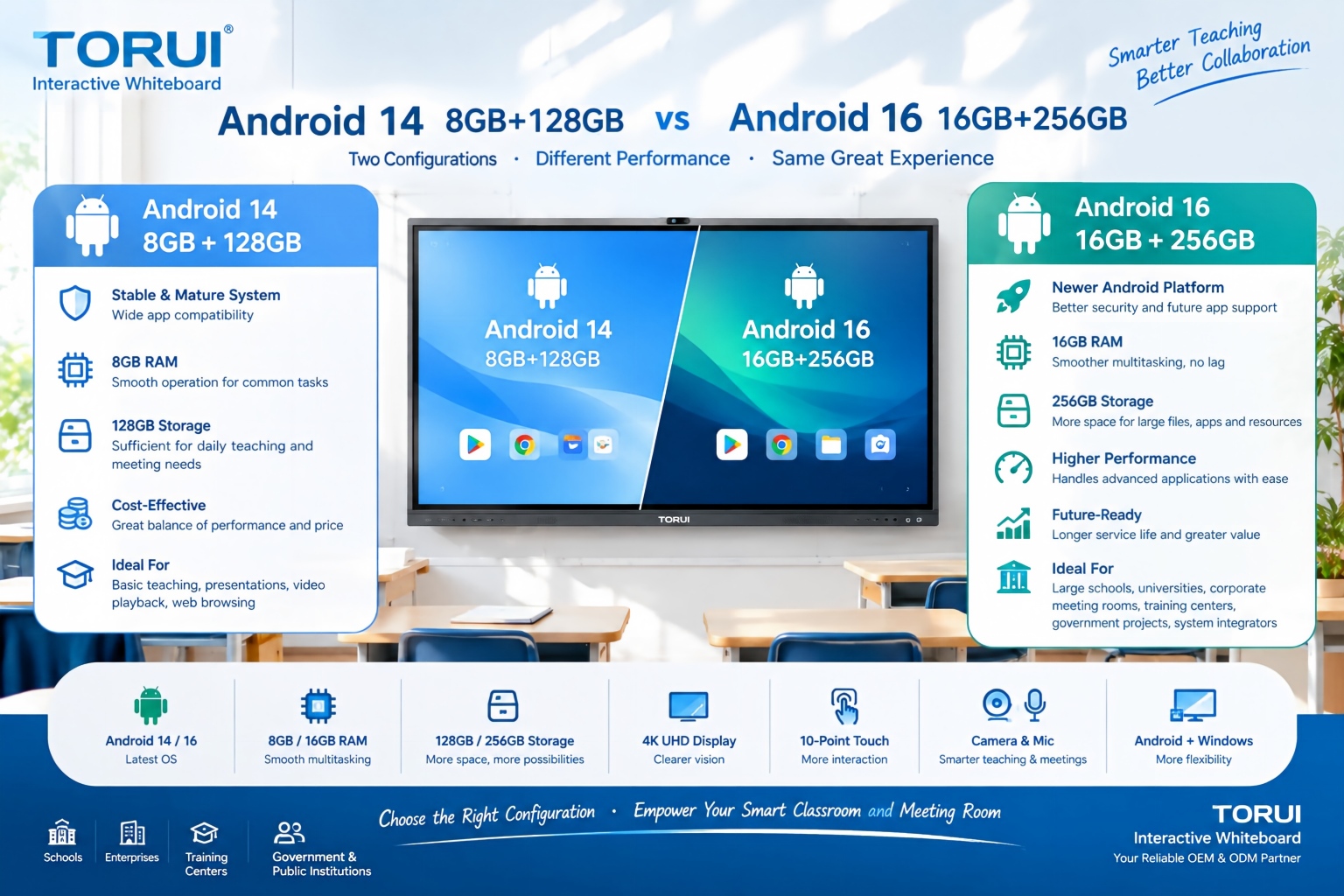
When choosing an interactive whiteboard for a school, training center, meeting room, or commercial project, the Android version and hardware configuration can significantly affect user experience. Two common configurations are Android 14 with 8GB RAM and 128GB storage and Android 16 with 16GB RAM and 256GB storage.
Android 14 8GB+128GB vs Android 16 16GB+256GB: Which Interactive Whiteboard Is Better?

Buying an interactive whiteboard is not simply about choosing the right screen size, resolution, or operating system. For B2B buyers, distributors, system integrators, schools, and corporate procurement teams, quality control is one of the most important factors affecting long-term reliability, user experience, warranty costs, and customer satisfaction.
Interactive Whiteboard Quality Control: What Should Buyers Check?
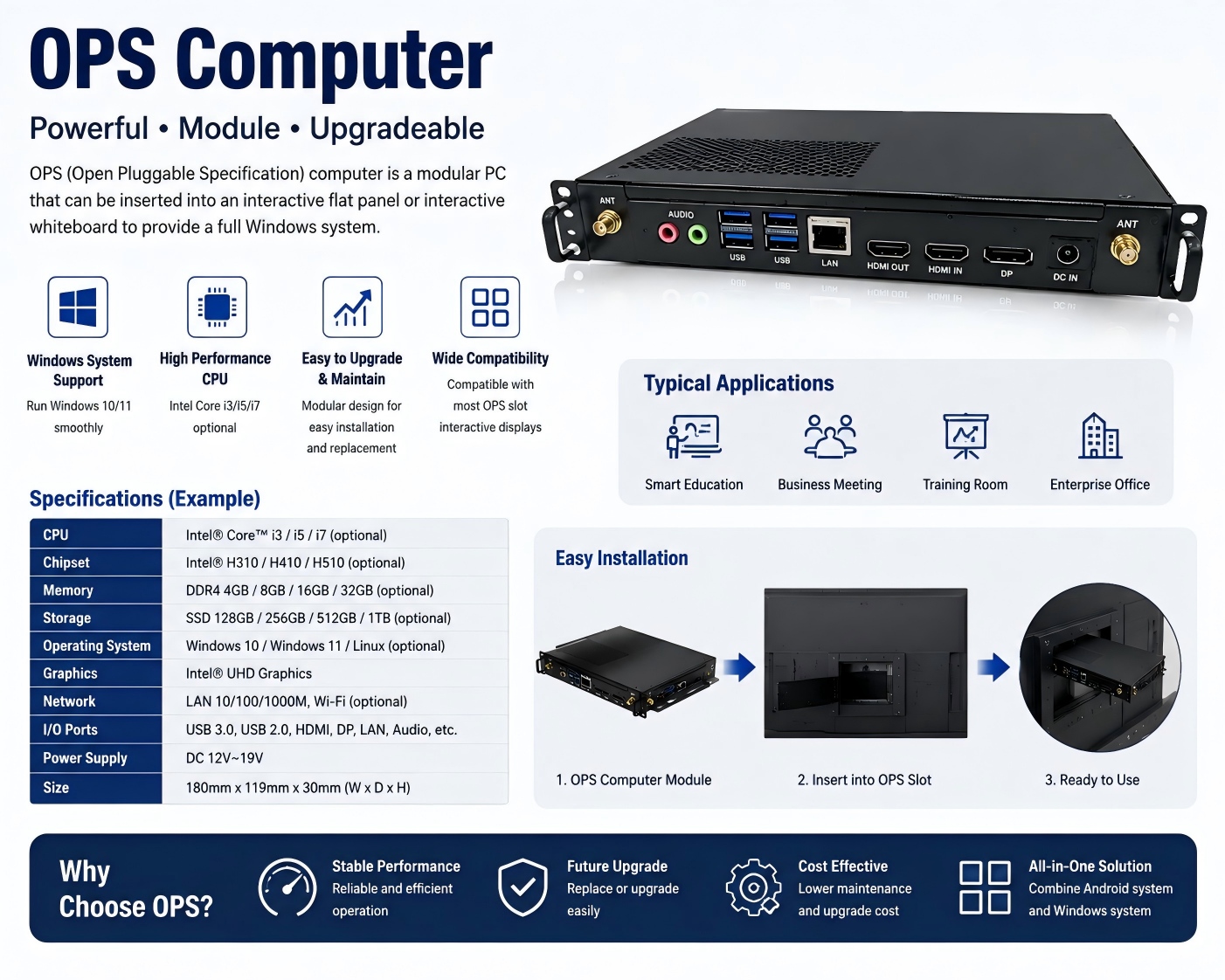
An OPS computer for an interactive whiteboard is a modular plug-in PC designed to add Windows-based computing power to an interactive display. OPS stands for Open Pluggable Specification, a standardized form factor originally developed for commercial interactive displays.
What Is an OPS Computer for Interactive Whiteboards?

Choosing the right chipset is an important decision when sourcing an interactive whiteboard for schools, conference rooms, training centers, government projects, or commercial applications. Among Rockchip platforms, RK3588 and RK3576 are two powerful options for modern Android interactive displays.
RK3588 vs RK3576: Which Chip Is Better for Interactive Whiteboards?