
What Is an OPS Computer for Interactive Whiteboards?
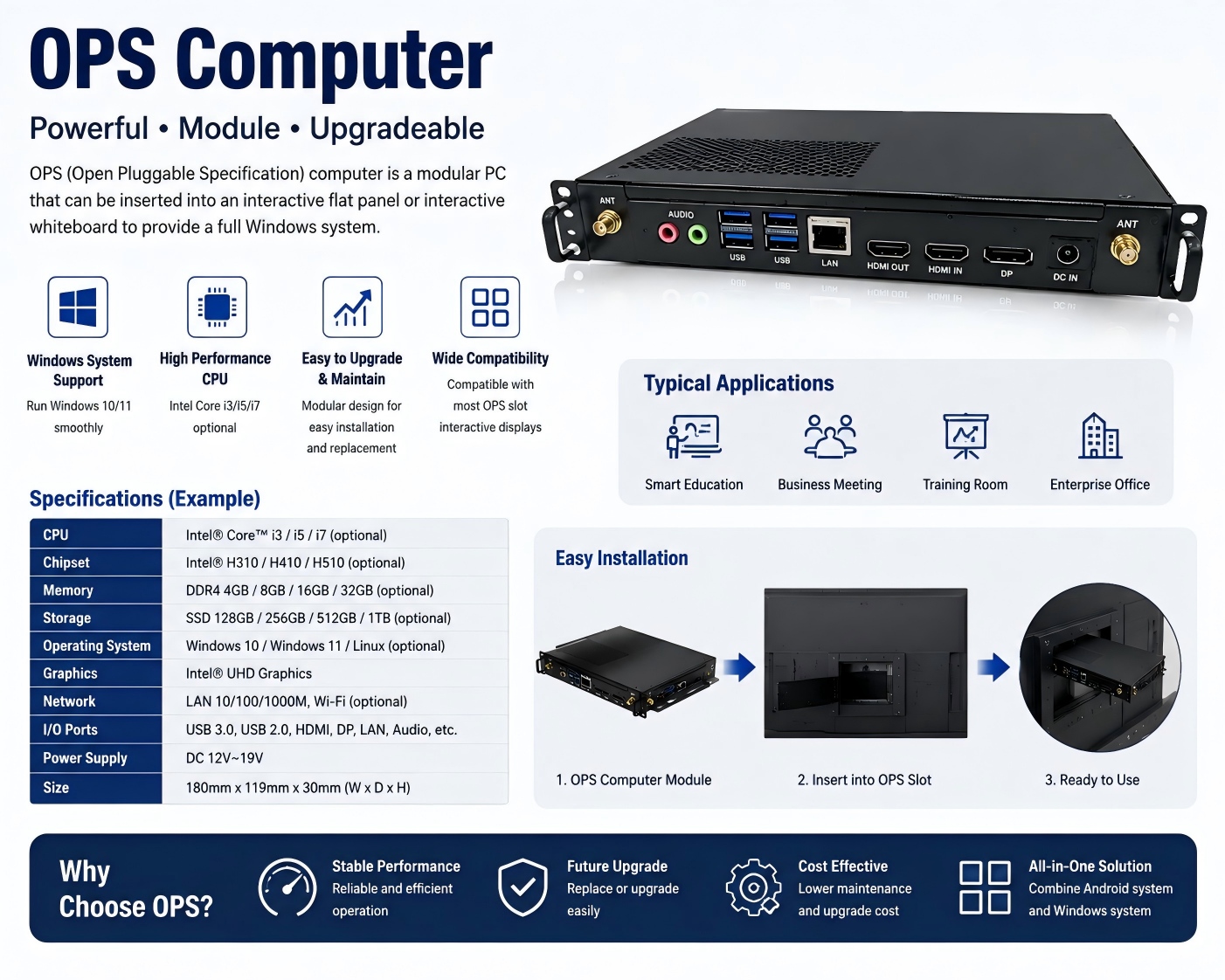
An OPS computer for an interactive whiteboard is a modular plug-in PC designed to add Windows-based computing power to an interactive display. OPS stands for Open Pluggable Specification, a standardized form factor originally developed for commercial interactive displays.
Unlike a built-in Android system, an OPS computer can be installed into a compatible interactive whiteboard through a dedicated OPS slot. This allows the display to function as both an Android interactive panel and a Windows-based computer, depending on the user's requirements.
For schools, businesses, system integrators, distributors, and other B2B buyers, understanding OPS is important when selecting an interactive whiteboard for long-term use.
How Does an OPS Computer Work?
An OPS computer is essentially a compact computer module designed to fit inside a compatible interactive flat panel.
After installation, the OPS module can provide a Windows computing environment for applications such as:
- Microsoft Office
- PowerPoint presentations
- Video conferencing
- Web browsers
- Interactive teaching software
- Digital classroom applications
- Enterprise collaboration software
- Specialized Windows applications
The interactive whiteboard continues to provide the large display, touch interface, speakers, cameras, microphones, and other hardware, while the OPS computer provides additional PC processing capability.
This modular architecture gives users more flexibility than relying on a single operating system.
OPS vs Built-in Android: What Is the Difference?
A built-in Android system is integrated directly into the interactive whiteboard's mainboard. It is usually convenient for everyday functions such as annotation, screen sharing, web browsing, multimedia playback, and Android applications.
An OPS computer, in contrast, provides a dedicated PC environment and is particularly useful when users need Windows software compatibility.
| Feature | Built-in Android | OPS Computer |
|---|---|---|
| Android applications | Yes | Depends on configuration |
| Windows applications | Limited | Yes |
| Microsoft Office | Android version | Full Windows environment |
| Upgrade flexibility | Limited by motherboard | Easier modular replacement |
| Installation | Built into panel | Pluggable module |
| Best for | Basic and standard applications | Advanced PC-based applications |
For many B2B projects, the best solution is not Android or OPS, but Android + OPS.
Why Do B2B Buyers Choose OPS?
The biggest advantage of an OPS computer is flexibility.
A school may use the built-in Android system for daily teaching and switch to Windows OPS when teachers need specialized educational software. A corporate customer may use Android for wireless presentation and collaboration, then switch to Windows for Microsoft Office, video conferencing, or enterprise applications.
OPS can also simplify product customization. Distributors and system integrators can select different processor, RAM, and storage configurations according to project requirements.
For example, a supplier may offer different configurations such as:
- Intel Core i3 / i5 / i7
- 8GB / 16GB / 32GB RAM
- 256GB / 512GB SSD
- Different Windows configurations
The exact available options depend on the interactive display and OPS motherboard design.
What Should You Check Before Buying an OPS Interactive Whiteboard?
B2B buyers should not simply ask, “Does this interactive whiteboard support OPS?”
Instead, check:
- OPS slot compatibility
- Processor generation and model
- RAM and SSD configuration
- Windows compatibility
- Graphics performance
- Wi-Fi and Bluetooth
- USB and display interfaces
- Cooling system
- Firmware and driver compatibility
- Availability of replacement OPS modules
It is also important to confirm whether the OPS module can be easily replaced or upgraded in the future.
Should You Choose an Interactive Whiteboard With OPS?
For basic classroom presentations and standard meeting-room applications, a built-in Android system may already be sufficient.
For customers requiring Windows software, advanced office applications, specialized teaching programs, enterprise software, or greater computing flexibility, an interactive whiteboard with OPS support is usually the better long-term solution.
For B2B buyers, the ideal configuration depends on the target market, application, budget, software requirements, and expected product lifecycle.
Why Choose TORUI Technology?
TORUI Technology provides interactive whiteboard solutions for schools, training centers, conference rooms, businesses, distributors, wholesalers, and system integrators.
With support for different screen sizes, Android configurations, OPS computers, RAM and storage options, cameras, microphones, and OEM/ODM customization, TORUI can help B2B customers build interactive display configurations according to specific project requirements.
The key advantage is flexibility: instead of offering only one standard configuration, TORUI can help buyers select the appropriate combination of display, touch technology, Android system, OPS computer, memory, storage, software, and accessories.
Final Takeaway
An OPS computer is a modular PC designed to extend the computing capabilities of an interactive whiteboard. It is especially valuable when users need Windows applications, advanced software compatibility, or a more flexible upgrade path.
For B2B buyers, Android + OPS provides a powerful combination of convenience and computing flexibility. Before purchasing, compare not only the OPS processor but also RAM, SSD, cooling, compatibility, upgradeability, software support, and the manufacturer's technical capabilities.
Choosing the right OPS configuration can significantly improve the long-term value and usability of an interactive whiteboard.
Interactive Whiteboard Quality Control: What Should Buyers Check?
RK3588 vs RK3576: Which Chip Is Better for Interactive Whiteboards?
Related Article



