
Smart interactive whiteboard: analysis of the advantages of various sizes
author: toruitech
2025-06-22
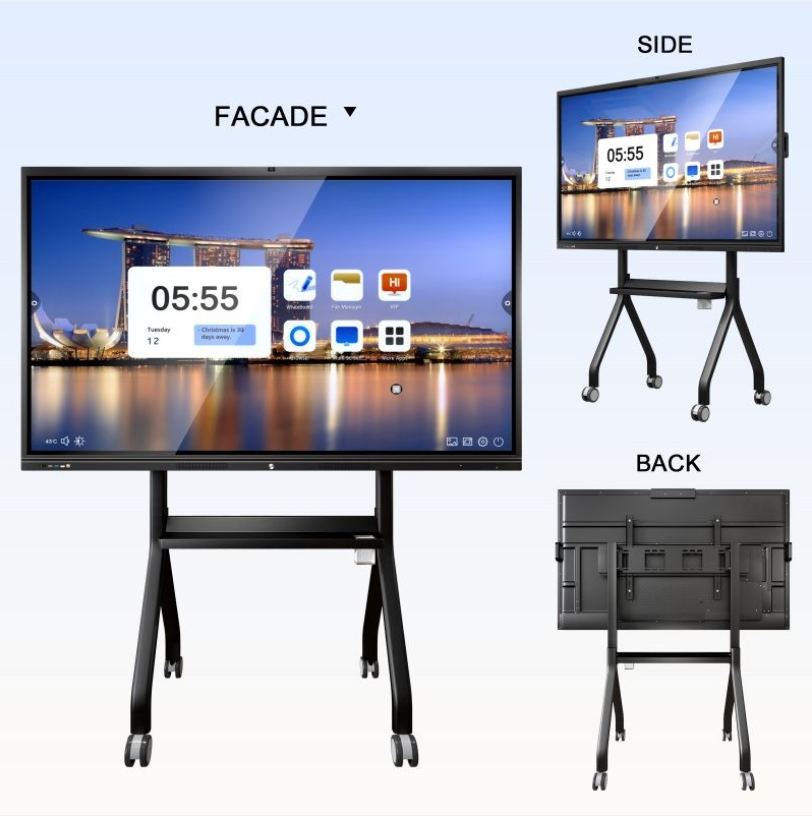
With the rapid development of technology, smart interactive whiteboards have become an important tool in the fields of education, business and team collaboration. It not only subverts the way traditional whiteboards are used, but also meets the needs of different scenarios through flexible designs of various sizes. This article will explore the advantages of smart interactive whiteboards of different sizes from multiple perspectives such as functionality, user experience, scene adaptation and convenience.
Diverse size options for smart interactive whiteboards
Smart interactive whiteboards usually provide a variety of sizes from small (such as 55 inches) to extra-large (such as 100 inches and above) to meet the different needs of users. This diverse size design shows advantages whether it is for small meeting rooms, classroom teaching, or large-scale event scenes.
Small smart interactive whiteboard: a combination of efficiency and convenience
Small smart interactive whiteboards are usually 55 inches or smaller in size. This type of whiteboard is known for its lightness and flexibility:
1. Easy to carry and place
Small whiteboards are more suitable for meeting rooms with smaller spaces or home office scenes. It does not take up too much space and can be easily hung on the wall or installed on a mobile stand to adapt to the layout of small and medium-sized rooms.
2. High flexibility
In modern flexible office environments, mobility is particularly important. Small smart whiteboards are lightweight and can be easily moved between rooms. In addition, such products usually support wireless connections and are highly compatible with laptops and smart tablet devices, allowing for quick discussions.
3. Suitable for quick interaction
For brainstorming or small collaborative discussions in a team, the 55-inch whiteboard size has a moderate display effect, and the content is easy to display in a centralized manner, which is suitable for accommodating a small number of viewers at the same time. In teaching, small-sized whiteboards are also ideal for tutoring or group work.
Medium-sized smart interactive whiteboards: balanced performance and scene adaptation
Medium-sized whiteboards include 65-75-inch designs, which are considered to be the most widely used sizes, suitable for classroom teaching, medium-sized conference rooms, and some highly specialized scenes.
1. Visual comfort
A 65-75-inch screen is enough to cover the perspective of multiple people. The projected content is clearly visible at a suitable distance, avoiding visual fatigue caused by a screen that is too small or too large when displaying information. Whether it is text, images or videos, it can present good clarity.
2. Adapt to a variety of scenarios
Medium-sized whiteboards are particularly widely used in the field of education. They can be used for various interactive teaching forms such as teaching, writing, and annotation. This size is particularly superior in classrooms with 30-50 students. In addition, in corporate meetings, whiteboards of this size will not appear cramped and do not need to take up too much space. It is an ideal choice for organizing brainstorming, program reporting and remote communication.
3. High versatility
Medium-sized whiteboards usually support higher touch interaction and complex software functions, including simultaneous multi-person writing, screen partition display and remote teaching functions, to meet the needs of professional scenarios. Its technical and size balance makes it a representative of "universal" smart whiteboards.
Large smart interactive whiteboards: visual shock and grand display
Large smart interactive whiteboards usually range from 86 inches to 110 inches, and their advantages are obvious, especially for large conference venues, hall displays and high-end scenes to optimize the visual experience.
1. The visual impact brought by the super-large screen
The super-large smart whiteboard makes the information display more shocking and is suitable for disseminating content to a larger audience. Whether it is a product launch conference for a business event or a large-screen meeting to display political and social data, the super-large whiteboard can ensure that the information is presented in a vivid and clear way.
2. Improve interaction efficiency
In discussions with a large number of people, large whiteboards significantly increase the participation of participants. Information display and handwriting interaction are not limited by the screen area and can accommodate multiple users at the same time. For example, in corporate collaboration, a 100-inch large screen can be split into multiple independent areas for different teams to handle tasks at the same time.
3. Immersive experience
In the field of education, the immersive experience of super-large whiteboards is its unique advantage. Through realistic image and video presentations, students are more likely to feel the appeal of learning content. Especially in scientific experiments and virtual scene reproduction, the advantages of large screens are particularly obvious.
4. Comprehensive adaptation for large venues
Conference halls, auditoriums, large event sites and other places usually require larger screen devices to meet visual needs. And smart whiteboards of 100 inches or more just meet this need completely.
Key factors for choosing the right size
The actual scene determines the demand for size, so choosing the right size of smart interactive whiteboards should start from the following dimensions:
Space size: Choose the right screen size according to the area of the venue to avoid information display being too small or too large.
Number of users: Small whiteboards are suitable for a small number of people, while large whiteboards are more suitable for a large audience.
Interactive needs: When the needs are simple, the performance of small or medium-sized whiteboards can meet the needs, while for complex interactive scenes, it is recommended to choose medium and large whiteboards.
Budget and convenience: Different sizes have different costs and transportation and installation requirements, and the appropriate equipment should be selected based on the budget.
Summary
The size selection of smart interactive whiteboards directly affects its efficiency and experience. Small whiteboards are light and flexible, medium whiteboards are comprehensive, and large whiteboards are shocking and high-end, each with its own advantages. Whether in the education industry or the corporate environment, understanding your own needs and choosing a smart interactive whiteboard of the right size will significantly improve work efficiency and interactive experience. In the future, as technology develops and user needs continue to update, smart interactive whiteboards will continue to expand size options and provide precise solutions for more scenarios.
Unlock the Potential of a 55-inch Interactive Whiteboard
Overview of the configuration of the Android system of smart interactive whiteboard
Related Article

Choosing the right interactive whiteboard size is an important decision for distributors, wholesalers, and education technology suppliers. The 65-inch, 75-inch, and 86-inch interactive whiteboards are popular options for classrooms, meeting rooms, training centers, and commercial projects.
65 vs 75 vs 86-Inch Interactive Whiteboard: Which Model Should Distributors Choose?

Choosing the right interactive whiteboard manufacturer in China is an important decision for distributors, wholesalers, education technology suppliers, and system integrators. The right manufacturing partner can help businesses improve product quality, maintain competitive pricing, customize products for local markets, and build a sustainable distribution business.
Who Are the Best Interactive Whiteboard Manufacturers in China for B2B Distributors and Wholesalers?

Choosing an interactive whiteboard involves more than comparing screen sizes and prices. For schools, businesses, distributors, wholesalers, and system integrators, understanding the technical specifications is essential to selecting a reliable product that meets different application requirements.
Interactive Whiteboard Technical Specifications Explained: A Complete Guide to CPU, RAM, Storage, Touch, Panel, OPS, Camera and Connectivity

Choosing an interactive whiteboard for a school, meeting room, training center, government organization or commercial project requires more than comparing screen size and price. The most important specifications include display resolution, brightness, touch technology, operating system, processor, memory, storage, OPS compatibility, camera and microphone performance, connectivity, durability and after-sales support.
How to Choose an Interactive Whiteboard: A Technical Guide to Display, Touch, OS, OPS, Camera and Connectivity