
Benefits of Introducing Interactive Whiteboards in Schools
author: toruitech
2025-11-14

The adoption of interactive whiteboards (IWBs) in schools has become a major trend in modern education, driven by the need to improve teaching quality, student engagement, and digital learning outcomes. As classrooms evolve from traditional chalk-and-talk environments to technology-enhanced learning spaces, interactive whiteboards offer a versatile platform that supports multimedia teaching, real-time collaboration, and more efficient lesson delivery. Below are the key benefits of introducing interactive whiteboards in schools and why they have become an essential tool for future-ready education.
1. Enhanced Student Engagement and Participation
Interactive whiteboards transform learning from passive listening into active participation. Teachers can incorporate videos, animations, diagrams, virtual labs, and interactive quizzes to keep students focused and motivated. The large, touch-enabled display allows learners to write, draw, and interact directly with the screen, making abstract concepts more concrete and easier to understand. This hands-on interaction greatly improves attention span and encourages students who may not participate in traditional classroom settings.
2. Improved Teaching Efficiency and Lesson Delivery
With an interactive whiteboard, teachers can prepare digital lesson plans, import resources instantly, annotate documents, and save classroom content for later review. This reduces time spent on manual writing or switching between devices, enabling more efficient use of class time. Teachers can also access online educational platforms, cloud storage, and digital textbooks in real time, which makes lesson delivery smoother and more flexible.
3. Supports Diverse Learning Styles
Every classroom includes students with different learning preferences—visual, auditory, kinesthetic, or a mix of all three. Interactive whiteboards help teachers address these needs by offering multimedia tools that combine sound, images, videos, and physical interaction. Visual learners can benefit from charts and animations, auditory learners can follow spoken explanations with audio content, and kinesthetic learners can engage through touch and movement. This inclusive approach results in better comprehension and higher academic performance.
4. Encourages Collaboration and Group Learning
Collaborative learning is crucial for developing communication, teamwork, and problem-solving skills. Interactive whiteboards make group activities more dynamic by allowing multiple students to write on the screen simultaneously, brainstorm ideas, or solve problems together. Wireless screen sharing from student devices also promotes open discussion and peer-to-peer learning. This digital collaboration mirrors real-world working environments and prepares students for future careers.
5. Access to a Wide Range of Digital Resources
One of the biggest advantages of IWBs is the ability to integrate online content directly into lessons. Teachers can access educational videos, interactive maps, simulations, e-books, and cloud-based tools to enrich classroom activities. This creates a more comprehensive learning experience and ensures students receive up-to-date, high-quality information.
6. Better Lesson Review and Content Retention
Interactive whiteboards allow teachers to save annotations, screenshots, and lesson notes with one click. Students can revisit the material on their devices or through the school’s learning management system (LMS). This supports revision, homework completion, and long-term knowledge retention. Recorded lessons are especially beneficial for students who were absent or need additional learning support.
7. Builds a Future-Ready Digital Learning Environment
By integrating technology into everyday teaching, schools help students develop digital literacy and confidence in using modern tools. Interactive whiteboards support hybrid learning, remote lessons, and content sharing, making them essential infrastructure for future-ready education systems.
China Interactive Whiteboard Supplier – OEM/ODM Smart Board Manufacturer
Modern Smart Classroom: Transforming Education Through Technology
Related Article
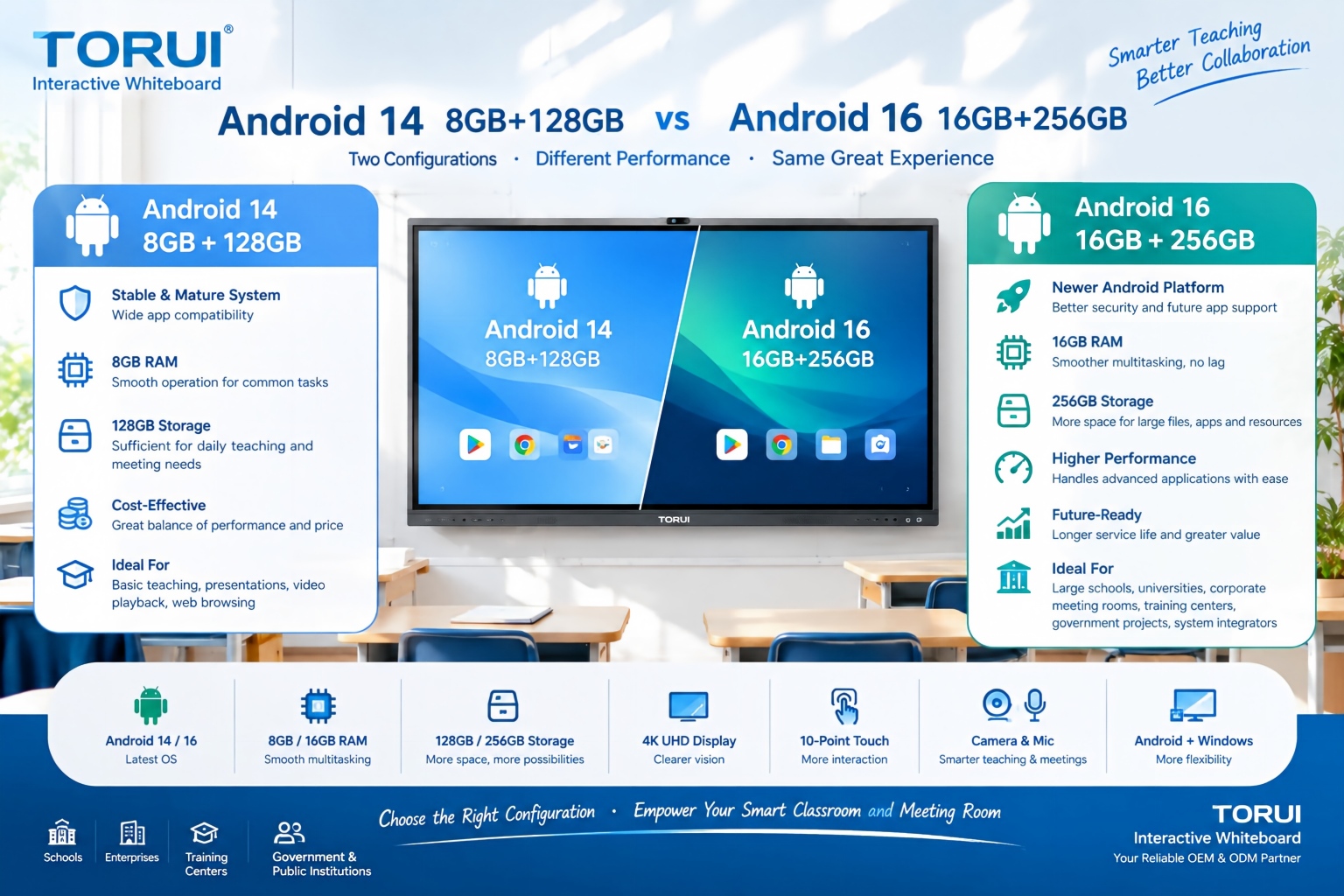
When choosing an interactive whiteboard for a school, training center, meeting room, or commercial project, the Android version and hardware configuration can significantly affect user experience. Two common configurations are Android 14 with 8GB RAM and 128GB storage and Android 16 with 16GB RAM and 256GB storage.
Android 14 8GB+128GB vs Android 16 16GB+256GB: Which Interactive Whiteboard Is Better?

Buying an interactive whiteboard is not simply about choosing the right screen size, resolution, or operating system. For B2B buyers, distributors, system integrators, schools, and corporate procurement teams, quality control is one of the most important factors affecting long-term reliability, user experience, warranty costs, and customer satisfaction.
Interactive Whiteboard Quality Control: What Should Buyers Check?
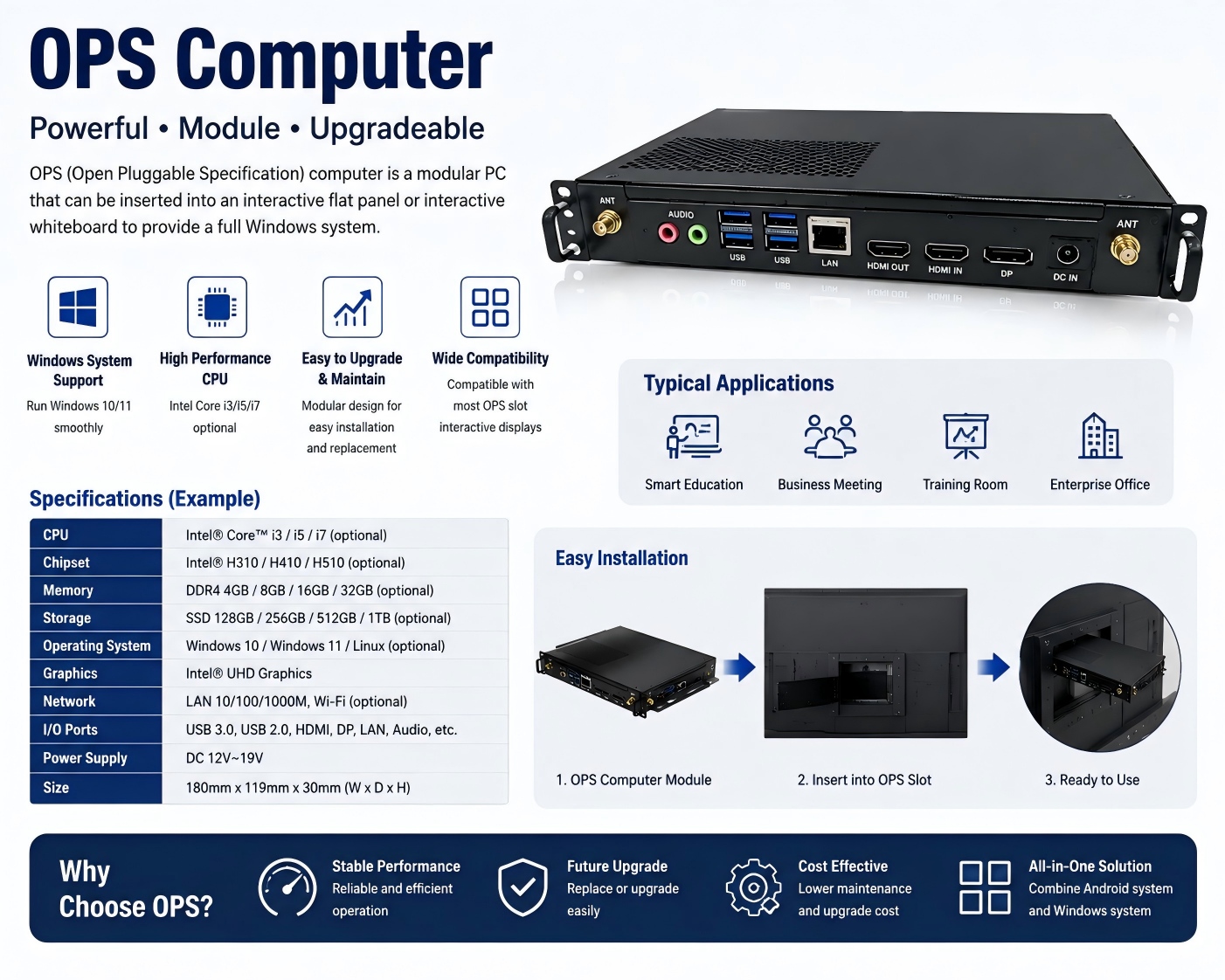
An OPS computer for an interactive whiteboard is a modular plug-in PC designed to add Windows-based computing power to an interactive display. OPS stands for Open Pluggable Specification, a standardized form factor originally developed for commercial interactive displays.
What Is an OPS Computer for Interactive Whiteboards?

Choosing the right chipset is an important decision when sourcing an interactive whiteboard for schools, conference rooms, training centers, government projects, or commercial applications. Among Rockchip platforms, RK3588 and RK3576 are two powerful options for modern Android interactive displays.
RK3588 vs RK3576: Which Chip Is Better for Interactive Whiteboards?