
Interactive Flat Panels: What They Are & How to Choose the Right One — 2025 Guide
author: toruitech
2025-10-18

An Interactive Flat Panel (IFP) is a large touchscreen display used in classrooms, meeting rooms, and collaborative workplaces. Unlike traditional projectors or simple TVs, IFPs combine high-resolution display, multi-touch or pen input, built-in computing or operating system support, and interactive software to enable dynamic, collaborative content creation, annotation, and real-time communication. In 2025, these devices are central to modern pedagogy and team workflows.
Why Interactive Flat Panels Matter
-
Enhanced Engagement & Collaboration
Students or meeting participants can work directly on the screen—drawing, annotating, moving content—making learning hands-on. This increases attention and retention compared to passive watching. -
Clarity & Visibility
Modern IFPs offer 4K or near-4K resolution, high brightness (typically 350–500 nits or more), and wide viewing angles. Anti-glare coatings and optical bonding improve visibility even in bright ambient light. -
Simplified Setup and Flexibility
Many models include built-in OS modules (Android, Windows, Linux), wireless screen sharing, front-facing ports (USB-C), and support for different video sources. Less dependency on external projectors reduces maintenance and setup complexity. -
Software Ecosystem Integration
Interactive whiteboard applications, cloud storage, classroom management tools, and compatibility with learning management systems (LMS) or collaboration suites (Google Workspace, Microsoft Teams) are now expected features. -
Durability & Long-Term Value
In education and business settings, units must be reliable, with solid warranties, support for firmware updates, and resistant hardware coatings that stand up to heavy use.
Key Specifications to Compare
Feature |
Ideal Standard in 2025 |
Why It Matters |
|---|---|---|
Screen Size |
75″ to 86″ |
Larger screens improve visibility for larger rooms without straining eyes. |
Resolution & Display Quality |
4K UHD; optical-bonded displays; anti-glare |
Sharp text/graphics; reduces reflection; improved contrast and durability. |
Brightness |
350–500 nits |
Ensures readability in ambient or daylight conditions. |
Touch & Pen Technology |
Multi-touch (20+ points); Active/EMR pen, low latency |
Natural writing feel; smooth gestures; supports multiple users. |
Operating System & Software |
Embedded Android or Windows; apps included; LMS integration |
Flexibility in software; fewer external devices needed. |
Connectivity & Ports |
USB-C, HDMI, front ports; wireless casting |
Easy access for instructors; compatibility with devices. |
Device Management & Security |
Remote updates, user profiles, data encryption, secure boot |
Protects investment; ensures student data privacy; minimizes downtime. |
How to Choose the Right IFP for Your Needs
-
Assess the Use Case:
• Classroom vs. lecture hall: larger sizes and brighter displays are needed for bigger rooms.
• Meeting rooms: focus on video conferencing support, input flexibility.
• Hybrid learning: strong on camera integration, network stability, and cloud-based tools. -
Check Software & Ecosystem Compatibility:
Ensure your new IFP works with your existing LMS, document formats, collaboration tools, and supports cloud sync. Consider licensing costs and ongoing subscriptions. -
Plan for Teacher/User Training:
Powerful hardware is only useful if users know how to integrate features—annotating, sharing, multi-user collaboration. Budget for onboarding and technical support. -
Factor Total Cost of Ownership (TCO):
Beyond purchase price, include shipping, installation, mounting, calibration, service contracts, warranty, and power usage. Durability and service availability often make higher upfront cost worthwhile.
Trends & Innovations in 2025
-
AI-powered features: handwriting recognition, automatic clean-up of annotations, speech-to-text, translation.
-
Hybrid class tools: built-in cameras and microphones, huddle space support, better video integration for remote participants.
-
Sustainability & health: low blue-light emissions, antimicrobial screen coatings, power-saving modes.
-
Modular updates: some models allow replaceable modules (e.g. compute module), making maintenance and upgrades more cost-efficient.
Conclusion
An interactive flat panel is more than hardware—it’s a gateway to more engaging, collaborative, and effective learning or teamwork. When choosing one, focus first on display quality (size, resolution, brightness), touch responsiveness and pen input, software and ecosystem compatibility, and long-term support. By keeping those priorities clear and considering total cost, organizations can select IFPs that deliver value, improve outcomes, and adapt as needs evolve.
Interactive Whiteboard Market Analysis in Southeast Asia
TORUI Interactive Whiteboard Specification Analysis
Related Article
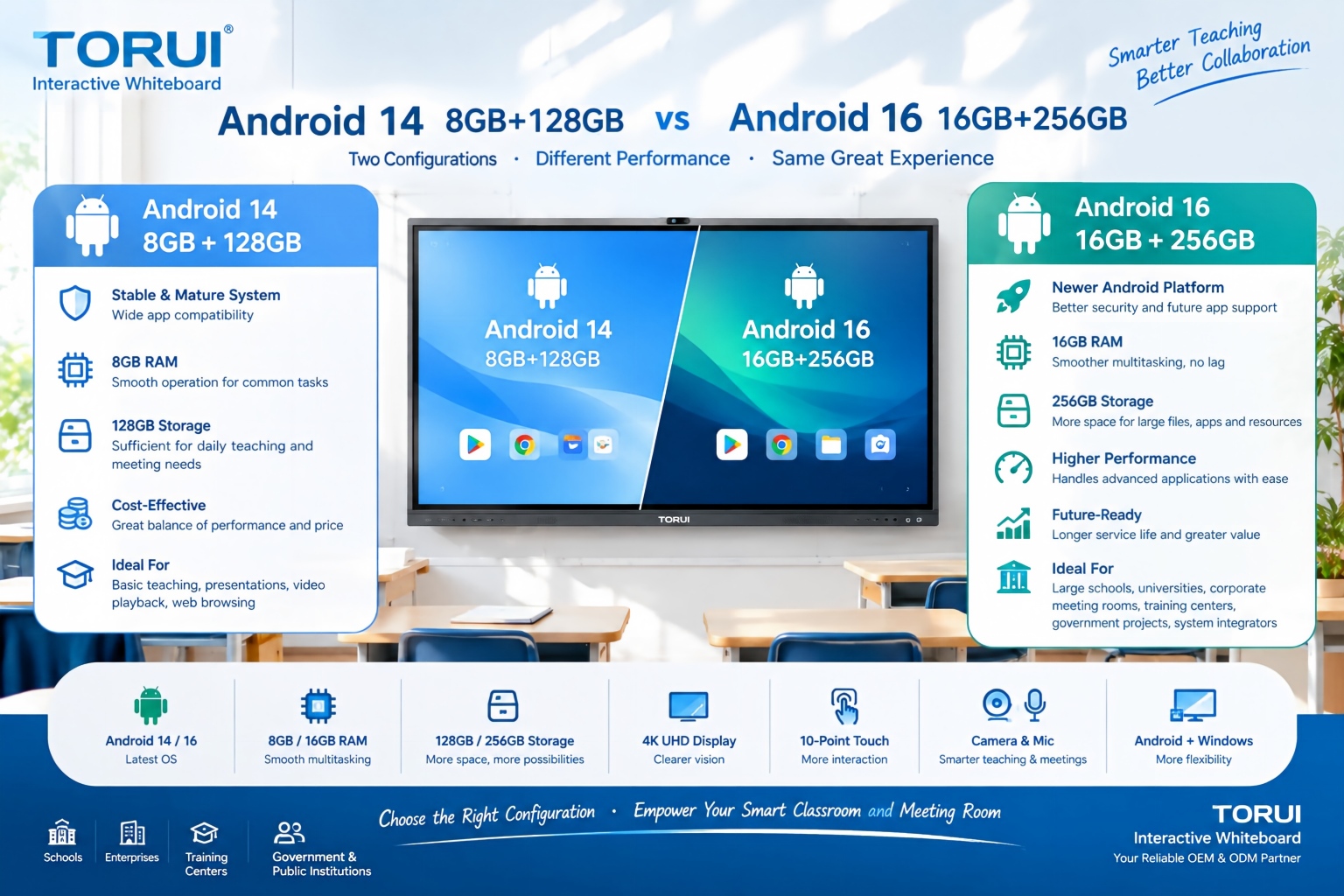
When choosing an interactive whiteboard for a school, training center, meeting room, or commercial project, the Android version and hardware configuration can significantly affect user experience. Two common configurations are Android 14 with 8GB RAM and 128GB storage and Android 16 with 16GB RAM and 256GB storage.
Android 14 8GB+128GB vs Android 16 16GB+256GB: Which Interactive Whiteboard Is Better?

Buying an interactive whiteboard is not simply about choosing the right screen size, resolution, or operating system. For B2B buyers, distributors, system integrators, schools, and corporate procurement teams, quality control is one of the most important factors affecting long-term reliability, user experience, warranty costs, and customer satisfaction.
Interactive Whiteboard Quality Control: What Should Buyers Check?
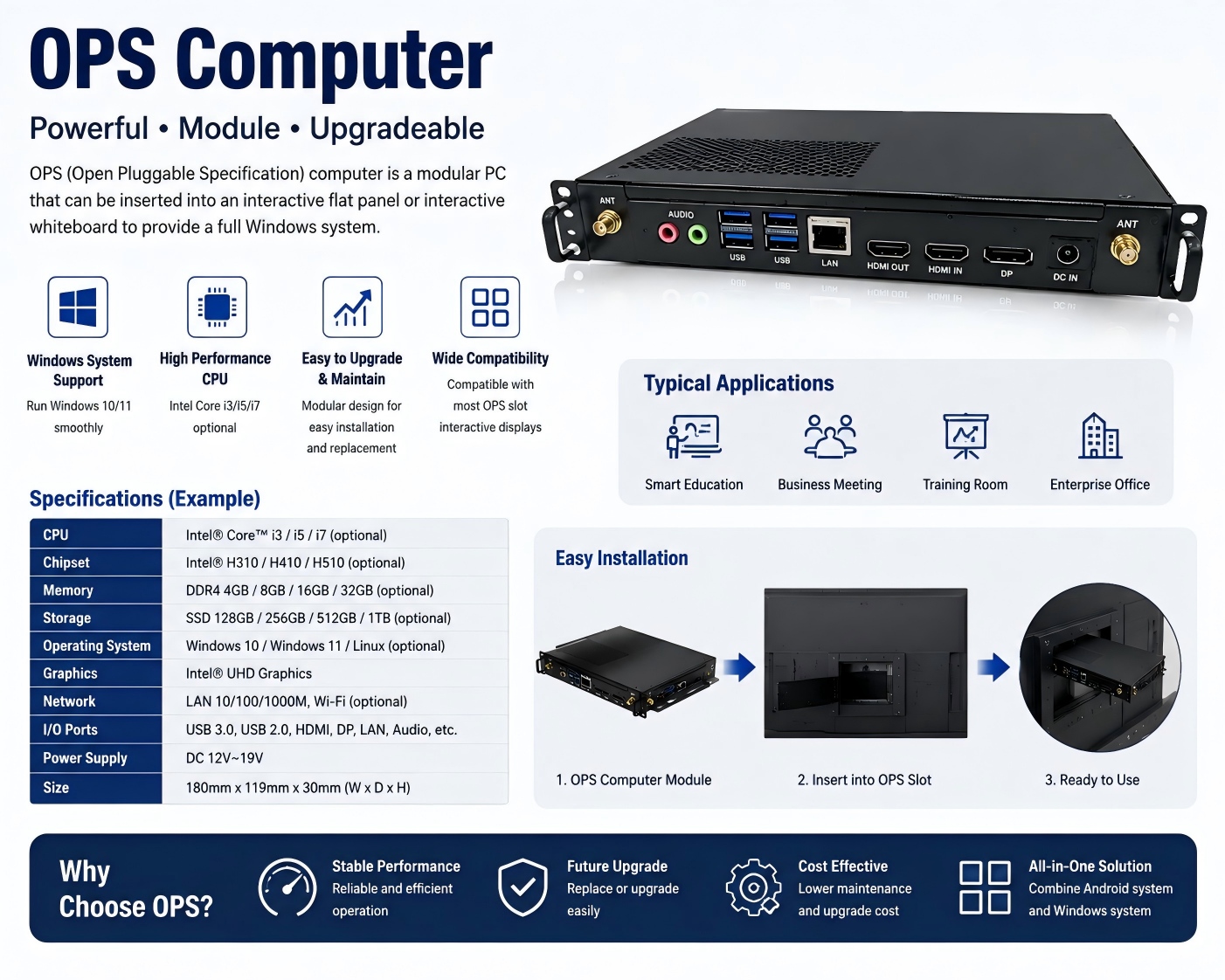
An OPS computer for an interactive whiteboard is a modular plug-in PC designed to add Windows-based computing power to an interactive display. OPS stands for Open Pluggable Specification, a standardized form factor originally developed for commercial interactive displays.
What Is an OPS Computer for Interactive Whiteboards?

Choosing the right chipset is an important decision when sourcing an interactive whiteboard for schools, conference rooms, training centers, government projects, or commercial applications. Among Rockchip platforms, RK3588 and RK3576 are two powerful options for modern Android interactive displays.
RK3588 vs RK3576: Which Chip Is Better for Interactive Whiteboards?