
Interactive Whiteboard Applications in Meetings
author: toruitech
2025-08-07
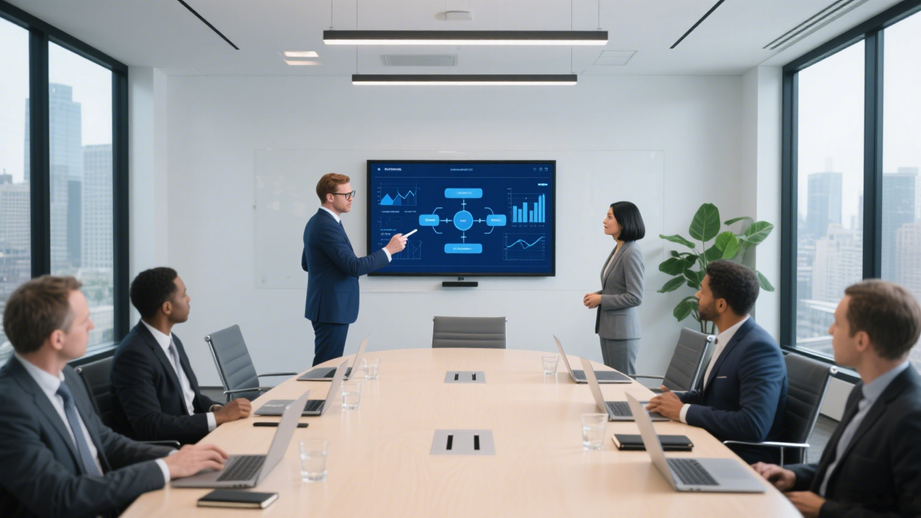
With the continuous advancement of information technology, modern office environments are placing higher demands on meeting efficiency, interactivity, and information visualization. Interactive whiteboards, as intelligent devices integrating multiple functions such as computers, projection, touch, and multimedia, are gradually replacing traditional whiteboards and projectors, becoming a standard feature in meeting rooms across businesses, governments, and educational institutions. This article will systematically explain the value of interactive whiteboards in meetings, focusing on their basic functions, advantages for meeting applications, practical application scenarios, and future development trends.
I. Basic Functions of Interactive Whiteboards
An interactive whiteboard is a smart device that combines a large display, a touch panel, and dedicated software. Connecting to a computer, it projects content onto the whiteboard screen and supports multi-touch, handwriting input, real-time annotation, file saving, and other operations. Users can write and draw directly, just like on a traditional whiteboard, or perform complex operations such as document editing, image annotation, PowerPoint presentations, and data analysis. Furthermore, interactive whiteboards support multimedia playback, wireless projection, remote collaboration, and cloud synchronization, providing comprehensive digital support for meetings.
II. Advantages of Interactive Whiteboards in Meetings
Intuitive and Efficient Information Presentation
Interactive whiteboards can intuitively display various meeting materials, such as PowerPoint presentations, spreadsheets, images, and videos, on a large, high-definition screen, making it easy for participants to quickly access and understand key information. Touch controls allow users to zoom in, zoom out, and switch pages at any time, making information browsing more flexible.
Real-time Annotation and Interaction Enhance Communication
Compared to traditional whiteboards, interactive whiteboards allow users to write, circle, and annotate directly on the screen, allowing any idea to be immediately visualized. Multi-touch functionality allows multiple people to operate simultaneously, facilitating collaborative discussions and brainstorming, significantly enhancing the interactivity and engagement of meetings.
Multimedia Integration Enriches Meeting Content
Interactive whiteboards can seamlessly integrate multimedia resources such as audio, video, and animation. During meetings, users can directly insert video presentations, play case studies, or use animations to illustrate complex processes, making meeting content more vivid and easy to understand, and improving the effectiveness of information delivery. Convenient Data Saving and Post-Meeting Tracking
All annotations, markups, and changes made during meeting discussions can be saved as images or documents with a single click on the interactive whiteboard, making them easy to organize, archive, and share after the meeting. This not only improves meeting standards but also facilitates subsequent tracking and review, reducing information omissions.
Support for Remote Meetings and Collaborative Work
Modern interactive whiteboards generally support network connectivity and remote collaboration. Remote participants can participate in meetings simultaneously via the network, enabling remote writing, annotation, and document sharing, breaking down physical limitations. Especially with the increasing prevalence of remote work and global teams, interactive whiteboards significantly improve cross-regional collaboration efficiency.
III. Practical Application Scenarios
Project Management and Progress Tracking
During project kickoff meetings, stage reports, and achievement reviews, interactive whiteboards can display data such as Gantt charts, flow charts, and KPIs. Team members can adjust plans and assign tasks in real time, and annotate key milestones on the spot, ensuring efficient and transparent project management.
Brainstorming and Innovation Discussions
The interactive whiteboard's multi-touch and handwriting features are ideal for brainstorming activities. Team members can simultaneously record creative ideas, categorize thoughts, and create mind maps on the whiteboard, fostering the exchange and integration of innovative thinking.
Training and Knowledge Sharing
During internal corporate training sessions and knowledge sharing sessions, interactive whiteboards facilitate instructors' presentation of courseware and real-time demonstrations of operational procedures. They can also answer student questions and provide key points, enhancing training effectiveness.
Remote Meetings and Cross-Departmental Collaboration
The interactive whiteboard's remote collaboration feature allows team members in different locations to participate in meetings simultaneously, enabling simultaneous file editing and real-time annotation, significantly improving cross-departmental and cross-regional collaboration efficiency.
Decision Analysis and Solution Review
During high-level meetings such as strategic decision-making and solution review, interactive whiteboards can display multi-dimensional data, compare different solutions, and facilitate real-time discussion and annotation, helping teams make informed decisions.
IV. Future Development Trends
Intelligence and AI Empowerment
With the advancement of artificial intelligence technology, future interactive whiteboards will integrate AI features such as voice recognition, gesture recognition, and intelligent grading, enabling more natural human-computer interaction and intelligent decision-making support.
Cloud Collaboration and Data Security
Cloud storage and collaboration features will be further enhanced to support access from more devices and data synchronization. At the same time, data encryption and rights management will be strengthened to ensure the security of meeting materials.
Scenario-Based and Customized
Based on the needs of various industries and businesses, interactive whiteboards will introduce more scenario-based and customized applications, such as medical consultations, judicial deliberations, and financial analysis, further expanding their application boundaries.
V. Conclusion
Interactive whiteboards, with their efficient information display, convenient interactive operation, powerful multimedia integration, and remote collaboration capabilities, have greatly improved the efficiency and quality of meetings. They not only optimize meeting processes and enhance teamwork, but also provide strong support for enterprises' digital transformation and intelligent office work. With the continuous advancement of technology and the deepening of its application, interactive whiteboards will play a greater role in more fields and become an indispensable tool for modern meetings.
Interactive Whiteboard Quality Control and Production Process
How do interactive whiteboards help teachers and students improve teaching efficiency?
Related Article

Choosing the right interactive whiteboard size is an important decision for distributors, wholesalers, and education technology suppliers. The 65-inch, 75-inch, and 86-inch interactive whiteboards are popular options for classrooms, meeting rooms, training centers, and commercial projects.
65 vs 75 vs 86-Inch Interactive Whiteboard: Which Model Should Distributors Choose?

Choosing the right interactive whiteboard manufacturer in China is an important decision for distributors, wholesalers, education technology suppliers, and system integrators. The right manufacturing partner can help businesses improve product quality, maintain competitive pricing, customize products for local markets, and build a sustainable distribution business.
Who Are the Best Interactive Whiteboard Manufacturers in China for B2B Distributors and Wholesalers?

Choosing an interactive whiteboard involves more than comparing screen sizes and prices. For schools, businesses, distributors, wholesalers, and system integrators, understanding the technical specifications is essential to selecting a reliable product that meets different application requirements.
Interactive Whiteboard Technical Specifications Explained: A Complete Guide to CPU, RAM, Storage, Touch, Panel, OPS, Camera and Connectivity

Choosing an interactive whiteboard for a school, meeting room, training center, government organization or commercial project requires more than comparing screen size and price. The most important specifications include display resolution, brightness, touch technology, operating system, processor, memory, storage, OPS compatibility, camera and microphone performance, connectivity, durability and after-sales support.
How to Choose an Interactive Whiteboard: A Technical Guide to Display, Touch, OS, OPS, Camera and Connectivity