
What Components Make Up an Interactive Whiteboard? A Complete Breakdown
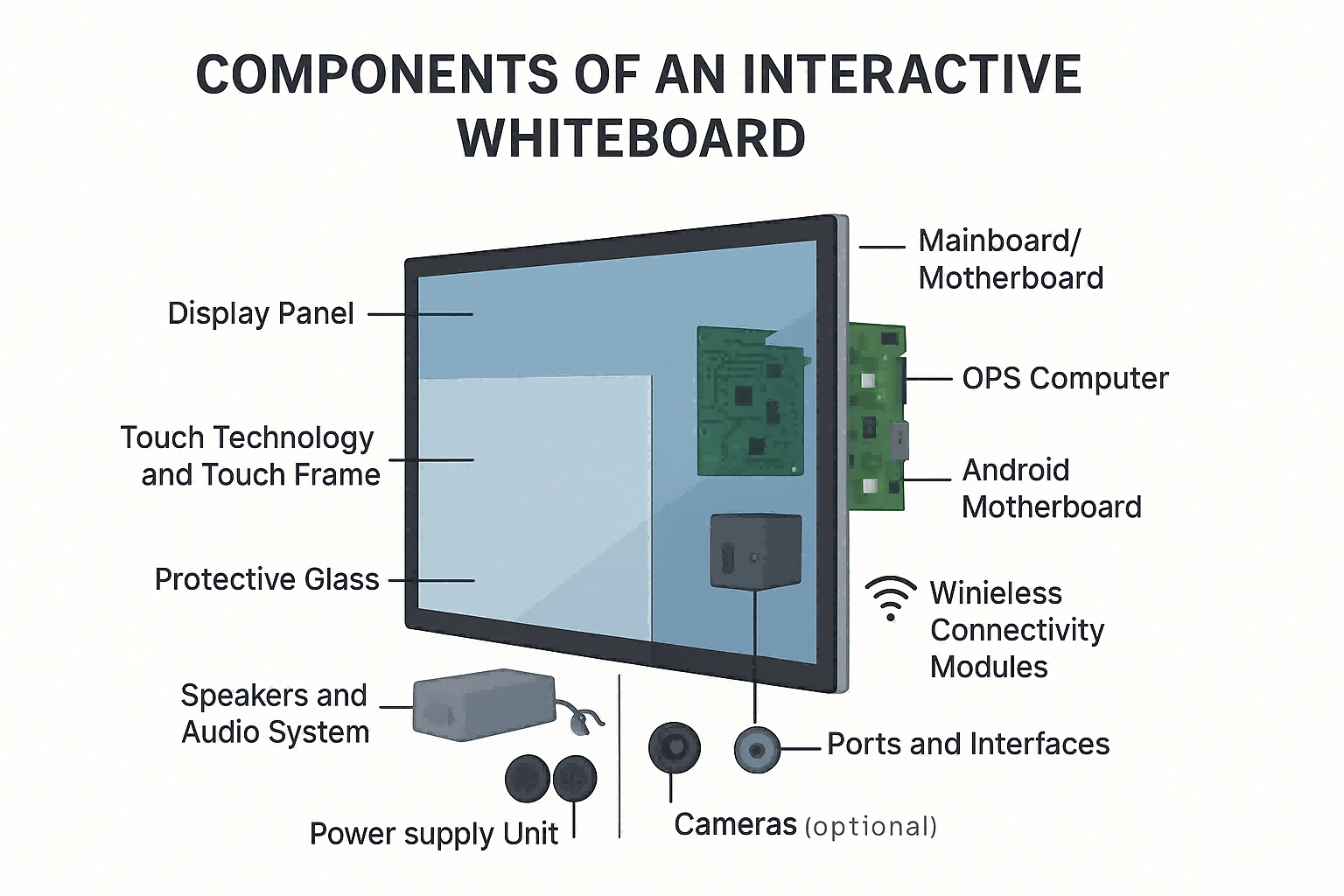
An interactive whiteboard (IWB) is a sophisticated hardware system that integrates display technology, touch sensing, computing power, and collaboration tools into one unified device. To fully understand its performance, reliability, and long-term maintenance, it is essential to know the internal and external components that make up the device. This guide provides a clear and comprehensive breakdown of the key parts of an interactive whiteboard and how each contributes to the overall user experience.
1. Display Panel (LCD / LED Screen)
The display panel is the core visual output component of an interactive whiteboard. Modern IWBs commonly use high-brightness, commercial-grade LCD/LED panels designed for continuous operation. Key attributes include:
-
Screen Size: Typically 65", 75", 86", or 98".
-
Resolution: 4K UHD is standard, and some high-end models support 8K.
-
Brightness and Contrast: Higher brightness ensures better visibility in classrooms and meeting rooms.
-
Viewing Angle: Wide viewing angles (178°) allow clear visibility from all seating positions.
A quality display panel determines color accuracy, clarity, and the overall visual experience.
2. Touch Technology and Touch Frame
Interactive whiteboards rely on multi-touch technology to enable writing, gestures, and object recognition.
The touch frame, installed around the edges of the display, houses infrared or optical sensors that detect touch points.
Common touch technologies include:
-
Infrared (IR) Touch: Cost-effective, widely used, supports up to 40-point touch.
-
Optical / Camera-Based Touch: Higher precision with cameras positioned in the frame.
-
Capacitive Touch: Similar to smartphone touch; highly accurate but more expensive.
The touch frame works with the firmware to convert touch signals into digital commands, enabling smooth writing and interaction.
3. Protective Glass
The display is protected by tempered, anti-glare (AG) glass that enhances durability and writing comfort.
Key characteristics:
-
Mohs hardness 7-level scratch resistance
-
Anti-glare etching to reduce reflections
-
High light transmission for image clarity
-
Smooth surface for natural writing feel
Protective glass ensures safety for students and teachers while maintaining clear image quality.
4. Mainboard / Motherboard
The mainboard is the electronic control center of the IWB. It coordinates all hardware components and manages communication between the touch system, display module, and operating system.
Core functions include:
-
Processing input and touch data
-
Managing device interfaces (USB, HDMI, LAN)
-
Controlling power distribution
-
Integrating audio and video processing
High-quality mainboards ensure stable performance and long service life.
5. OPS Computer (Optional but Common)
Most modern IWBs support the OPS (Open Pluggable Specification) PC, a modular computer inserted into a dedicated slot. This allows the device to operate like a Windows PC, providing flexibility for high-performance applications.
Typical OPS specs:
-
CPU: Intel i5/i7/i9 or ARM-based processors
-
Storage: 128GB–512GB SSD
-
RAM: 8GB–32GB
-
OS: Windows 10/11
The OPS module makes software upgrades easier and keeps the system scalable for different teaching or corporate environments.
6. Android Motherboard (Built-In)
Aside from OPS, most interactive whiteboards include a built-in Android system for instant booting and basic whiteboard functions.
Features include:
-
Quick startup with low power consumption
-
Preloaded educational or meeting apps
-
Wireless screen mirroring
-
File management and annotation tools
The Android module ensures that the IWB remains usable even without an OPS computer installed.
7. Power Supply Unit (PSU)
The power supply unit delivers stable voltage and current to all electronic components.
Reliable PSUs include:
-
Over-current protection
-
Over-voltage protection
-
Temperature control
-
Energy-efficient output
A stable PSU prevents flickering, random shutdowns, or component damage.
8. Speakers and Audio System
Most IWBs integrate dual 15W–20W front-facing speakers.
Important audio features:
-
Clear projection for classroom use
-
Low distortion even at high volume
-
Support for multimedia playback
-
Optional external soundbar
The speaker placement affects audio quality significantly—front-facing designs perform best.
9. Cameras (Optional)
Many corporate and education models include:
-
1080p or 4K built-in cameras
-
Privacy shutter
-
AI-driven auto-focus or speaker tracking
These enhance video conferencing and remote learning.
10. Wireless Connectivity Modules
Connectivity is crucial for collaborative environments. Common modules include:
-
Wi-Fi 2.4G/5G/6
-
Bluetooth 5.0 or 5.2
-
Miracast / AirPlay / Google Cast support
These enable wireless screen sharing and device management.
11. Ports and Interfaces
An interactive whiteboard typically includes:
-
HDMI (Input/Output)
-
USB Type A / Type C
-
LAN / RJ45
-
VGA (older models)
-
Audio in/out
-
RS232 for control systems
A well-designed I/O layout ensures compatibility with laptops, document cameras, microphones, and external displays.
12. Metal Frame and Back Cover
The structural components provide:
-
Heat dissipation
-
Rigidity for wall mounting or mobile stands
-
Protection for internal boards
-
Cable management channels
A robust frame enhances durability and safety, especially in busy classrooms.
Conclusion
An interactive whiteboard is a highly integrated system composed of display technology, touch sensing, computing modules, audio systems, and structural components. Understanding these parts helps buyers evaluate product quality, compare brands, and make informed purchasing decisions. Whether used for education or corporate collaboration, the synergy of these components ensures a smooth, responsive, and engaging interactive experience.
TORUI Delivers High-Quality Products and Outstanding Service for Global Customers
Complete Buyer’s Guide to Interactive Whiteboards (2025)
Related Article



