
Interactive Whiteboards with Built-in Cameras, Microphones, and Speakers
author: toruitech
2025-08-24
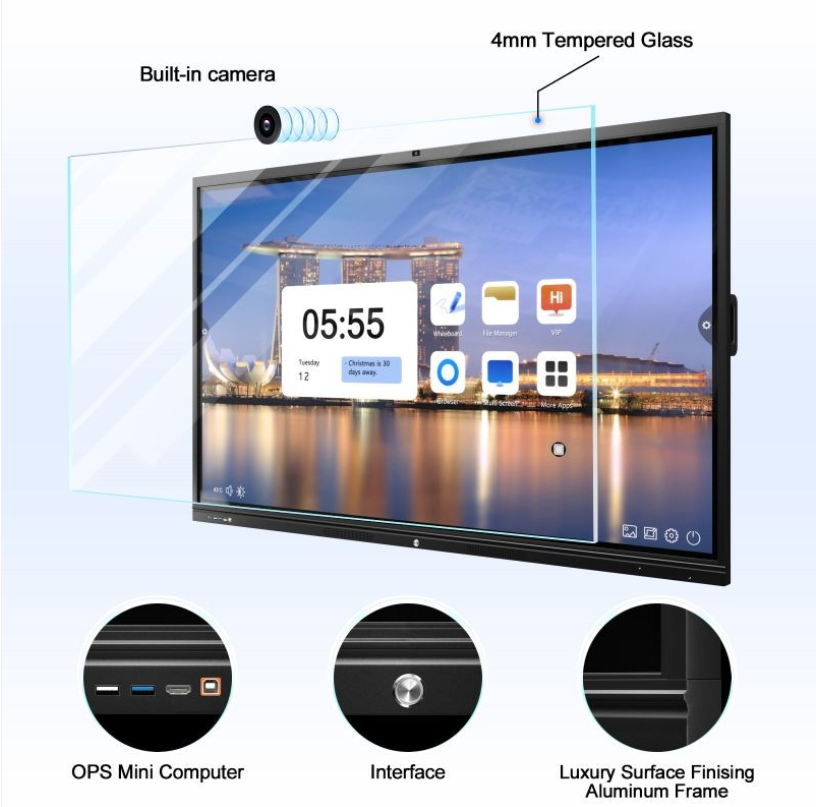
With the continuous advancement of information-based education, interactive whiteboards have become indispensable smart devices in modern campuses and corporate meetings. Their powerful multimedia integration capabilities have revolutionized teaching, training, and communication. Most importantly, interactive whiteboards are typically equipped with a built-in camera, microphone, and speaker. These three hardware components form the technical foundation for efficient interaction and remote collaboration, creating a richer and more convenient user experience.
First, the integration of a camera greatly expands the application boundaries of interactive whiteboards. In remote learning or video conferencing scenarios, cameras can capture real-time images of the classroom or conference room, transmitting the live situation to remote participants. During the teacher's presentation, students can not only see the content on the blackboard but also observe the teacher's expressions and movements, enhancing the efficiency of information transmission and the impact of the class. Cameras can also be used to automatically identify speakers and record teaching sessions for post-class review and analysis of teaching quality. For businesses, cameras enable seamless communication between teams across multiple locations, improving communication efficiency and collaboration quality.
Second, microphones, as the core device for sound acquisition, play a crucial role in interactive whiteboard applications. Highly sensitive microphones clearly capture audio in classrooms or meeting rooms, ensuring timely and accurate audio reception for remote participants, whether teachers are explaining, students are asking questions, or teams are discussing. Some interactive whiteboards utilize microphone arrays with intelligent noise reduction and echo cancellation, effectively filtering out ambient noise for pure and smooth voice communication. This technological advantage not only enhances the interactive experience of remote learning but also ensures the quality of communication during online meetings.
The speakers are responsible for clearly reproducing audio information. The built-in speakers can play remote participants' voices, instructional videos, courseware audio, and other content, ensuring a balanced and clear listening experience for every listener. The high-quality speaker design ensures layered and detailed sound, ensuring authentic sound reproduction for both spoken language presentations and multimedia presentations, enhancing the immersive and engaging classroom experience. For those with special hearing needs, the speaker's volume and sound quality adjustment functions facilitate personalized instruction.
The synergistic application of these three features significantly enhances the interactivity and intelligence of the interactive whiteboard. Taking remote hybrid learning as an example, teachers use a whiteboard to write and demonstrate, while a camera simultaneously transmits the image, a microphone captures audio, and speakers play back questions or discussions from remote students, creating a "face-to-face" communication experience. Students can participate in interactions at any time, and teachers can adjust teaching strategies in real time based on feedback, truly achieving a student-centered and efficient classroom. Furthermore, interactive whiteboards support recording and playback functions, facilitating post-class review and resource sharing, fostering innovation and optimization of teaching models.
From a technical perspective, the multimedia integration of interactive whiteboards is not only reflected in the hardware level; it is also deeply integrated with the software system. Multimedia teaching resources, interactive courseware, remote conferencing platforms, and other applications can fully utilize the hardware capabilities of cameras, microphones, and speakers to achieve multi-dimensional information exchange using images, text, audio, and video. According to internet searches, interactive whiteboards facilitate interaction between teachers and students, and between students themselves. They also integrate the advantages of modern multimedia teaching, enriching classroom resources and communication platforms.
In short, the integrated application of interactive whiteboards with built-in cameras, microphones, and speakers has greatly enriched the interactive methods of teaching and conferencing, promoting the high-quality development of information-based education and smart office. In the future, with the further integration of artificial intelligence and big data technologies, interactive whiteboards will continue to optimize hardware performance and interactive experience, becoming an important supporting platform for smart campuses and smart enterprises.
Analysis of the Main Application Scenarios of Interactive Whiteboards
Analysis of Interactive Whiteboard Touch Methods
Related Article
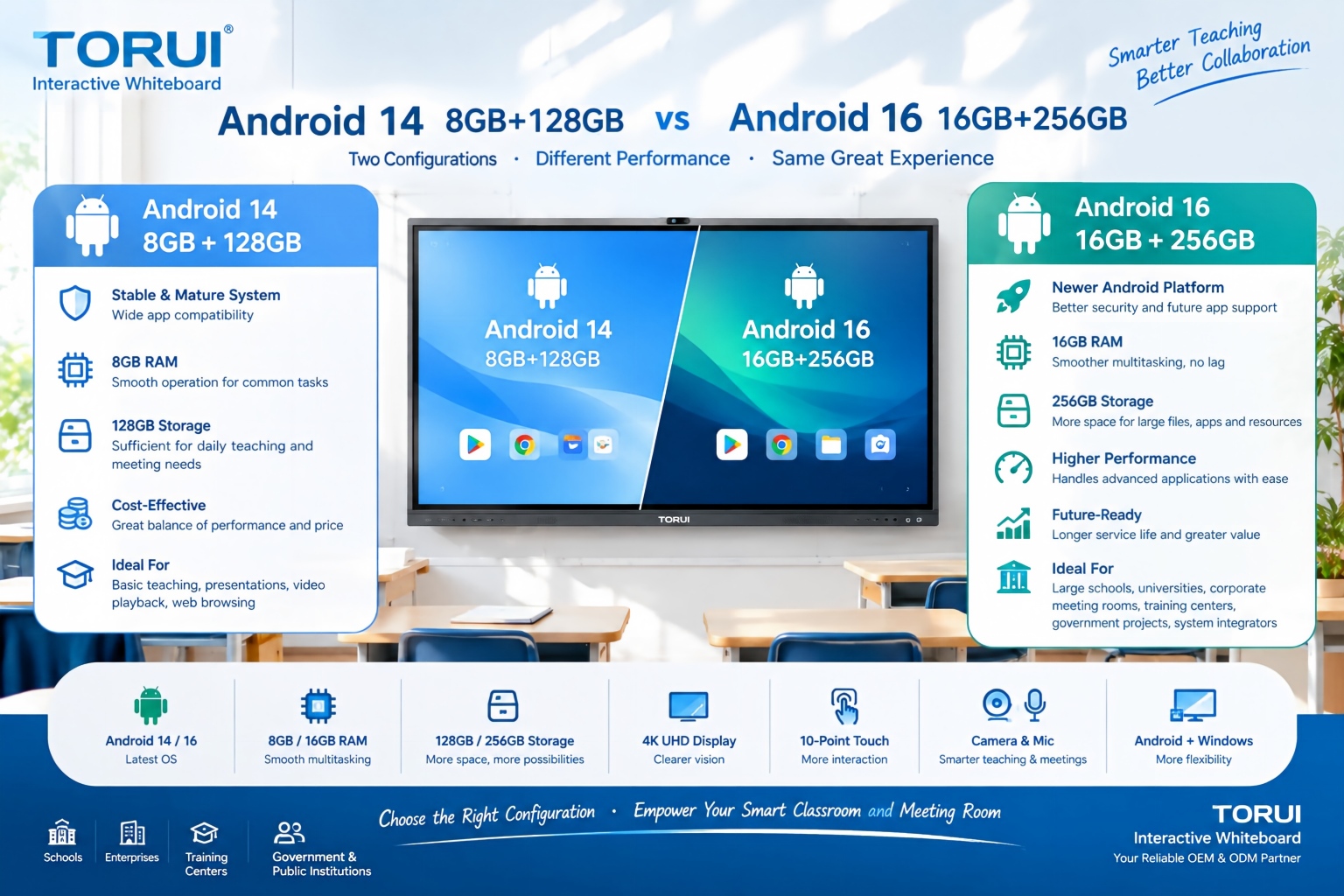
When choosing an interactive whiteboard for a school, training center, meeting room, or commercial project, the Android version and hardware configuration can significantly affect user experience. Two common configurations are Android 14 with 8GB RAM and 128GB storage and Android 16 with 16GB RAM and 256GB storage.
Android 14 8GB+128GB vs Android 16 16GB+256GB: Which Interactive Whiteboard Is Better?

Buying an interactive whiteboard is not simply about choosing the right screen size, resolution, or operating system. For B2B buyers, distributors, system integrators, schools, and corporate procurement teams, quality control is one of the most important factors affecting long-term reliability, user experience, warranty costs, and customer satisfaction.
Interactive Whiteboard Quality Control: What Should Buyers Check?
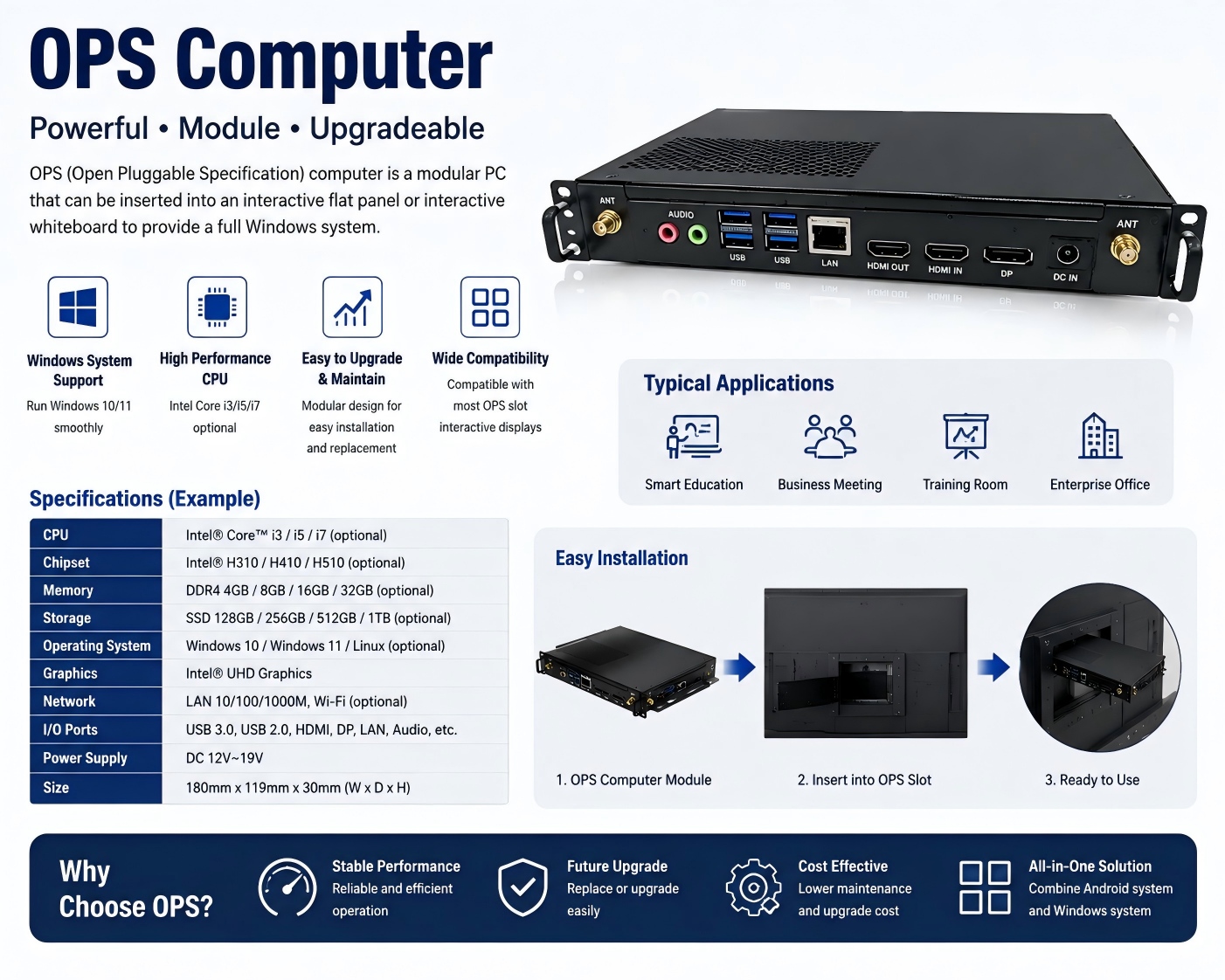
An OPS computer for an interactive whiteboard is a modular plug-in PC designed to add Windows-based computing power to an interactive display. OPS stands for Open Pluggable Specification, a standardized form factor originally developed for commercial interactive displays.
What Is an OPS Computer for Interactive Whiteboards?

Choosing the right chipset is an important decision when sourcing an interactive whiteboard for schools, conference rooms, training centers, government projects, or commercial applications. Among Rockchip platforms, RK3588 and RK3576 are two powerful options for modern Android interactive displays.
RK3588 vs RK3576: Which Chip Is Better for Interactive Whiteboards?