
Key Highlight Features of Interactive Whiteboards
author: toruitech
2025-12-21
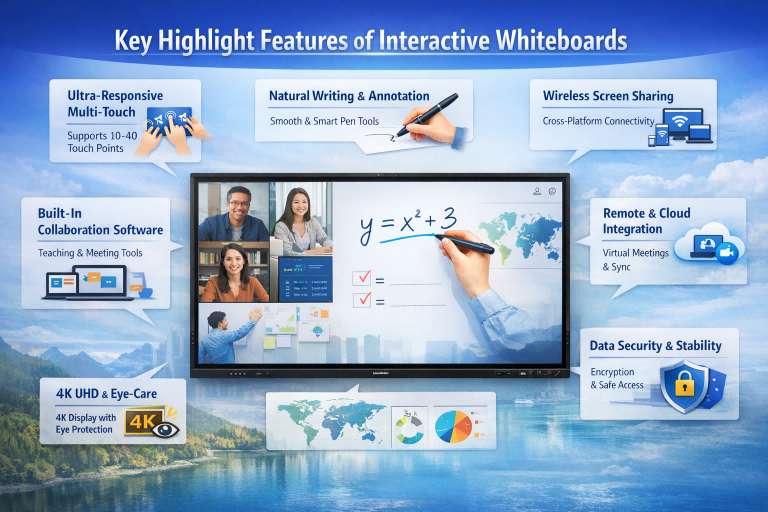
Interactive whiteboards (IWBs) have become essential tools in smart education and modern business environments. Unlike traditional display devices, interactive whiteboards integrate advanced touch technology, intelligent software, and cloud connectivity to deliver highly efficient and engaging user experiences. The following is a professional overview of the core features and highlights of interactive electronic whiteboards, designed to help users and buyers make informed decisions.
1. High-Precision Multi-Touch Technology
One of the most important core features of an interactive whiteboard is its multi-touch capability. Professional IWBs typically support 20 to 40 simultaneous touch points, allowing multiple users to write, draw, zoom, and manipulate content at the same time. This function is critical for collaborative classrooms, group discussions, and interactive meetings, significantly increasing engagement and teamwork.
2. Smooth Writing Experience and Intelligent Tools
A high-quality interactive whiteboard offers a natural, low-latency writing experience similar to pen on paper. Users can easily switch pen colors, thicknesses, and tools, while smart features such as handwriting recognition, shape correction, gesture erasing, and object selection improve efficiency. These intelligent writing tools make teaching and presentations clearer and more professional.
3. Wireless Screen Sharing and Device Compatibility
Cross-platform wireless screen sharing is a key highlight of modern IWBs. They support instant screen casting from Windows, macOS, Android, and iOS devices without cables. Users can switch between multiple devices seamlessly, annotate shared content in real time, and control presentations directly from the whiteboard, creating a flexible and dynamic working environment.
4. Built-In Software Ecosystem for Teaching and Meetings
Interactive whiteboards are more than hardware; they come with powerful built-in software. Core functions often include digital whiteboard apps, lesson creation tools, screen recording, real-time polling, split-screen display, and file management. Many systems also support third-party applications, allowing customization for different educational models and corporate workflows.
5. 4K UHD Display with Eye-Care Protection
Visual performance is another core highlight. Most modern interactive whiteboards feature 4K ultra-high-definition displays with high brightness and contrast, ensuring clear visibility in large rooms. Eye-care technologies such as low blue light emission, anti-glare coating, and flicker-free backlighting help reduce eye strain during long periods of use, making IWBs suitable for classrooms and conference rooms alike.
6. Remote Collaboration and Cloud Integration
With cloud connectivity, interactive whiteboards support remote teaching, hybrid meetings, and real-time collaboration across locations. Whiteboard content can be synchronized instantly with remote participants, while cloud storage allows easy saving, sharing, and retrieval of materials. This feature greatly enhances efficiency in global education and distributed teams.
7. System Stability and Data Security
Professional IWBs are designed for continuous, high-frequency use. Core security features include user account management, access control, data encryption, and automatic file cleanup after sessions. A stable operating system ensures smooth performance, protects sensitive information, and minimizes downtime.
Conclusion
The core highlight features of interactive whiteboards—multi-touch interaction, intelligent writing tools, wireless sharing, powerful software, 4K eye-care displays, cloud collaboration, and strong security—make them indispensable for modern classrooms and meeting spaces. Choosing a reliable, feature-rich interactive whiteboard can significantly improve communication efficiency, collaboration quality, and overall user experience.
Delivery Time and Logistics for Interactive Whiteboards in International Trade
TORUI Interactive Whiteboard Certifications: CE, FCC, RoHS and What They Mean for Buyers
Related Article

Choosing the right interactive whiteboard size is an important decision for distributors, wholesalers, and education technology suppliers. The 65-inch, 75-inch, and 86-inch interactive whiteboards are popular options for classrooms, meeting rooms, training centers, and commercial projects.
65 vs 75 vs 86-Inch Interactive Whiteboard: Which Model Should Distributors Choose?

Choosing the right interactive whiteboard manufacturer in China is an important decision for distributors, wholesalers, education technology suppliers, and system integrators. The right manufacturing partner can help businesses improve product quality, maintain competitive pricing, customize products for local markets, and build a sustainable distribution business.
Who Are the Best Interactive Whiteboard Manufacturers in China for B2B Distributors and Wholesalers?

Choosing an interactive whiteboard involves more than comparing screen sizes and prices. For schools, businesses, distributors, wholesalers, and system integrators, understanding the technical specifications is essential to selecting a reliable product that meets different application requirements.
Interactive Whiteboard Technical Specifications Explained: A Complete Guide to CPU, RAM, Storage, Touch, Panel, OPS, Camera and Connectivity

Choosing an interactive whiteboard for a school, meeting room, training center, government organization or commercial project requires more than comparing screen size and price. The most important specifications include display resolution, brightness, touch technology, operating system, processor, memory, storage, OPS compatibility, camera and microphone performance, connectivity, durability and after-sales support.
How to Choose an Interactive Whiteboard: A Technical Guide to Display, Touch, OS, OPS, Camera and Connectivity