
Smart Boards: Opening a New Chapter in Smart Education and Efficient Collaboration
author: toruitech
2025-08-04
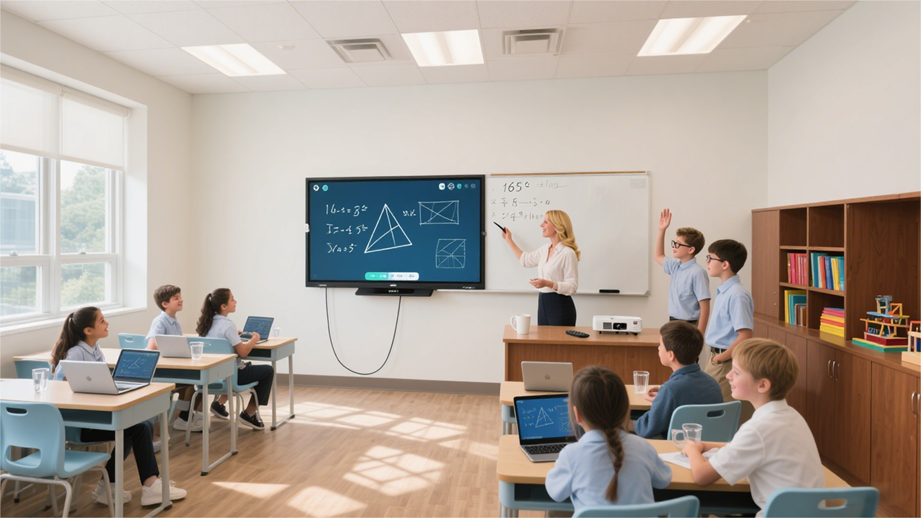
As the wave of informatization and digitalization sweeps the world, modern society is increasingly demanding efficient communication, interactive collaboration, and innovative learning methods. Against this backdrop, smart boards (intelligent interactive electronic whiteboards, hereinafter referred to as "Smart Boards") have emerged and are rapidly becoming a crucial tool for digital transformation in various sectors, including education, business, and government. This article will comprehensively analyze how these smart devices are ushering in a new era of smart education and efficient office work, including their definition, technical principles, key functions, application scenarios, advantages, and challenges.
I. Definition and Development of Smart Boards
A smart board is an interactive electronic whiteboard that integrates multiple functions, including touch, writing, presentation, and collaboration. By integrating a large display, touch-sensing system, computer processing unit, and multimedia interface, it allows users to write, draw, drag, and annotate directly on the screen, enabling human-computer interaction and multi-party collaboration. Since its introduction in the early 1990s, the Smart Board has undergone continuous iterations and upgrades, evolving from its initial single-touch, limited functionality to today's support for multi-touch, high-resolution displays, wireless connectivity, and cloud collaboration, becoming a standard feature in smart classrooms and conference rooms.
II. Smart Board Technical Principles
The core technologies of the Smart Board primarily include touch sensing, display technology, and software systems. Currently, mainstream touch technologies include infrared touch, capacitive touch, and electromagnetic induction. For example, infrared touch uses infrared transmitters and receivers arranged around the whiteboard, forming a dense infrared light network. When a finger or pen touches the screen, it blocks some of the infrared light. The system calculates the location of the blocked light and accurately identifies the coordinates of the touch point. Furthermore, Smart Boards integrate high-resolution LCD or LED displays, ensuring clear images and vibrant colors. The accompanying software platform supports presentations in multiple file formats, real-time annotation, data synchronization, and remote collaboration, greatly enhancing the device's practicality and scalability.
III. Smart Board Key Functions
Multi-touch and Handwriting Recognition
Modern smart boards generally support 20 or more touch points, allowing multiple people to operate simultaneously. Advanced handwriting recognition technology quickly converts handwritten content into digital text for easy saving and editing.
Real-time Annotation and Interactive Presentation
Users can directly annotate and markup any presentation document, image, webpage, or other content, enhancing the interactivity of classes or meetings. Annotations can be saved, shared, or reviewed with a single click, facilitating document organization and review.
Multimedia Integration and Wireless Screen Projection
The Smart Board supports the playback of multimedia content such as video, audio, and animation. It can also connect to computers, phones, tablets, and other devices via wireless screen projection, enabling quick content switching and remote collaboration.
Cloud Synchronization and Remote Collaboration
Leveraging a cloud platform, the Smart Board can store and synchronize courseware and meeting materials in the cloud, supporting remote collaboration and video conferencing across locations, transcending time and space constraints and improving teamwork efficiency.
IV. Smart Board Application Scenarios
Smart Education
Smart Boards have become a core device in smart classrooms in primary and secondary schools, universities, and vocational training institutions. Teachers can use the smart whiteboard to present courseware, annotate in real time, and provide interactive quizzes, sparking student interest and increasing class participation. Students can also participate in presentations and collaborative problem-solving, fostering teamwork and innovation.
Corporate Meetings and Collaboration
Smart Boards are widely used in corporate meeting rooms, innovation labs, and other locations. They not only display PowerPoint presentations and data reports, but also facilitate efficient collaboration, such as brainstorming, process analysis, and project management. Remote conferencing capabilities enable seamless communication and collaboration among team members located across cities and even countries.
Government and Public Services
Government departments use smart boards for policy briefings, data analysis, and emergency response, improving the efficiency of information dissemination and the scientific nature of decision-making. Public services, such as museums and libraries, also use smart whiteboards to enhance the visitor experience and dissemination of information.
V. Advantages and Challenges of Smart Boards
Advantages:
Enhanced interactivity and participation: Smart Boards break away from the traditional one-way teaching and meeting model, enhancing interaction and collaboration between teachers, students, and colleagues.
Information integration and efficient management: They integrate multiple information resources, facilitating content display, storage, and review, improving data management efficiency.
Easy maintenance and upgrades: Modern smart whiteboards support remote maintenance and software upgrades, reducing operational costs.
Challenges:
Procurement and Maintenance Costs: High-end smart board devices are relatively expensive, placing some small and medium-sized institutions under pressure to purchase them.
Technical Adaptation and Training: Some users are unfamiliar with new technologies and require systematic training and an adaptation period.
Data Security and Privacy: Data security issues arising from cloud-based collaboration require urgent attention, and security measures must be strengthened.
VI. Future Outlook
With the integration of cutting-edge technologies such as artificial intelligence, the Internet of Things, and big data, smart boards will enable more intelligent functions such as voice recognition, gesture recognition, and personalized recommendations. Future smart whiteboards will not only serve as platforms for information display and interaction, but also as intelligent hubs for smart education and efficient office work. They will promote educational equity, corporate innovation, and the advancement of social informatization, opening up broader opportunities for knowledge dissemination, communication, and collaboration.
Conclusion
As an innovative product of the digital age, smart boards are reshaping how we learn, work, and live. Whether in classrooms, meeting rooms, or public spaces, smart boards, with their powerful interactive capabilities and diverse application scenarios, are driving intelligent transformation in the information age. With the continuous advancement of technology and the deepening of its application, smart boards will undoubtedly become an indispensable cornerstone of a smart society.
How do interactive whiteboards help teachers and students improve teaching efficiency?
A Detailed Explanation of Infrared Touch Points on Interactive Whiteboards
Related Article

Choosing the right interactive whiteboard size is an important decision for distributors, wholesalers, and education technology suppliers. The 65-inch, 75-inch, and 86-inch interactive whiteboards are popular options for classrooms, meeting rooms, training centers, and commercial projects.
65 vs 75 vs 86-Inch Interactive Whiteboard: Which Model Should Distributors Choose?

Choosing the right interactive whiteboard manufacturer in China is an important decision for distributors, wholesalers, education technology suppliers, and system integrators. The right manufacturing partner can help businesses improve product quality, maintain competitive pricing, customize products for local markets, and build a sustainable distribution business.
Who Are the Best Interactive Whiteboard Manufacturers in China for B2B Distributors and Wholesalers?

Choosing an interactive whiteboard involves more than comparing screen sizes and prices. For schools, businesses, distributors, wholesalers, and system integrators, understanding the technical specifications is essential to selecting a reliable product that meets different application requirements.
Interactive Whiteboard Technical Specifications Explained: A Complete Guide to CPU, RAM, Storage, Touch, Panel, OPS, Camera and Connectivity

Choosing an interactive whiteboard for a school, meeting room, training center, government organization or commercial project requires more than comparing screen size and price. The most important specifications include display resolution, brightness, touch technology, operating system, processor, memory, storage, OPS compatibility, camera and microphone performance, connectivity, durability and after-sales support.
How to Choose an Interactive Whiteboard: A Technical Guide to Display, Touch, OS, OPS, Camera and Connectivity