
TORUI Interactive Whiteboard Manufacturing Process: A Full-Cycle Service System You Can Trust
author: toruitech
2025-11-19
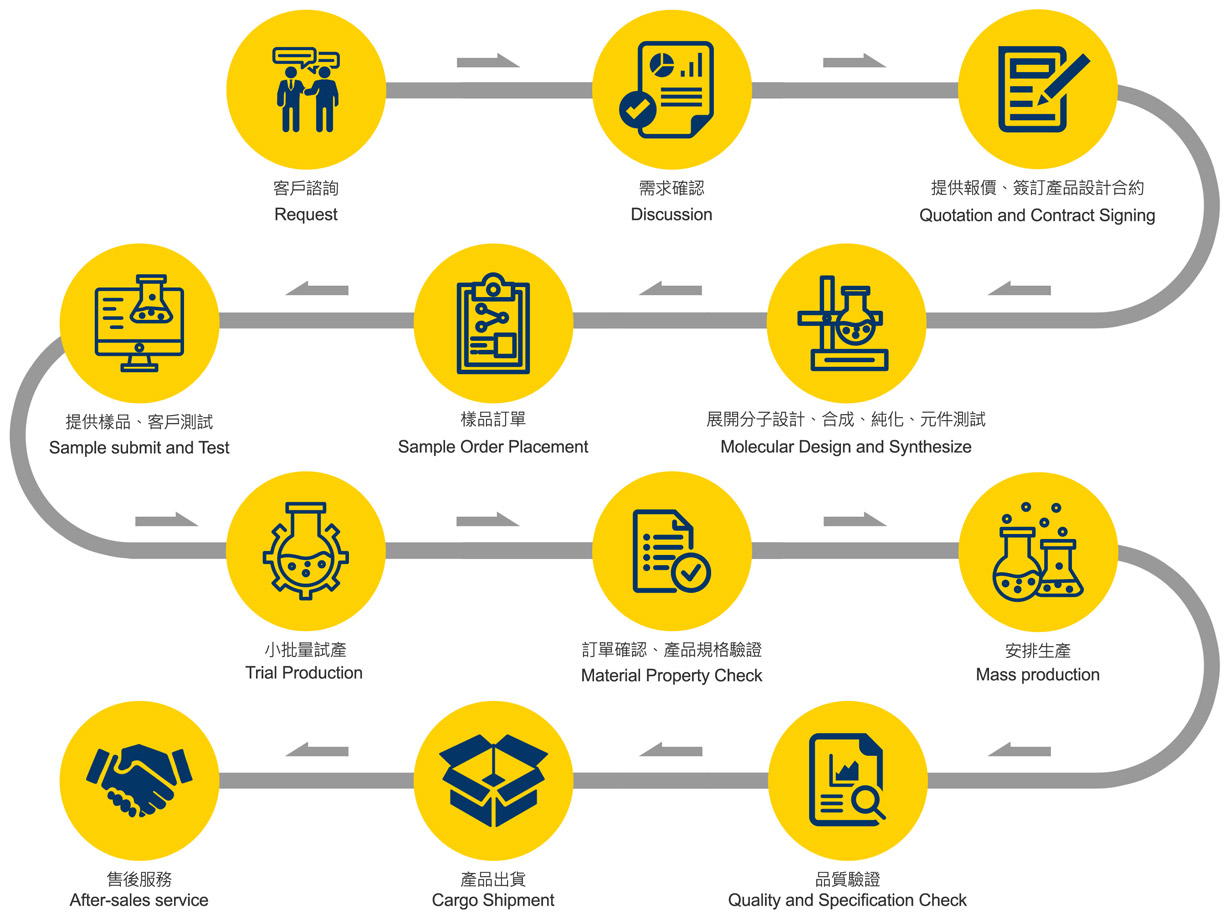
As a leading manufacturer of interactive whiteboards, TORUI is committed to delivering reliable, innovative, and high-performance solutions for global education, business, and government users. To ensure every interactive display meets international standards, TORUI has established a complete, transparent, and efficient service workflow—from initial consultation to mass production and after-sales support. The process shown in the flowchart reflects TORUI’s philosophy of customer-centered customization, strict quality control, and continuous innovation.
1. Customer Request: Understanding Your Needs Clearly
The journey begins with a customer request. TORUI listens carefully to your specific application scenarios—whether for classrooms, conference rooms, training centers, or smart offices. During the request and discussion stages, our team clarifies key specifications such as screen size, touch technology, OPS configuration, operating system, connectivity requirements, and installation methods.
This early communication ensures we fully understand your expectations, helping us design a solution that fits your project perfectly.
2. Technical Discussion and Contract Confirmation
Once requirements are confirmed, TORUI provides a clear quotation and finalizes the product design plan. The quotation and contract signing step builds mutual trust and ensures both parties align on the technical details, delivery schedule, and cooperation terms.
At this stage, TORUI emphasizes transparency—every cost, specification, and timeline is clearly communicated, helping clients plan their procurement and deployment effectively.
3. R&D and Engineering: Transforming Ideas Into Feasible Solutions
The process then moves into R&D, represented in the chart as “Molecular Design and Synthesize.” For TORUI interactive whiteboards, this step corresponds to:
-
Hardware layout design
-
Touch frame structure optimization
-
Display panel color and brightness calibration
-
Software and firmware adaptation
-
Component compatibility and reliability testing
This technical foundation guarantees that the future sample and mass-production units deliver accurate touch performance, smooth operation, and long-lasting stability.
4. Sample Order and Testing: Ensuring Functionality and Quality
Clients may place a sample order to evaluate the product. TORUI provides prototypes for customer testing, allowing users to verify:
-
Touch accuracy and responsiveness
-
Display clarity, brightness, and color consistency
-
System performance and UI fluency
-
Audio output and sensor functions
-
Safety standards (anti-glare, anti-damage, heat dissipation, etc.)
Sample testing is a crucial step for validating the feasibility and practicality of the solution before moving into production.
5. Trial Production and Full Quality Inspection
After the sample is approved, TORUI conducts a trial production run to verify assembly processes and component stability. A detailed material property check ensures all internal components—from motherboards to LCD panels—meet international standards such as CE, FCC, and ISO.
Following the verification, mass production begins. TORUI’s factories implement:
-
Automated SMT and assembly lines
-
Multi-stage functional testing
-
24-72 hour aging tests
-
Final visual and specification inspections
This strict workflow guarantees consistency and reliability across every unit.
6. Cargo Shipment and After-Sales Support
TORUI arranges packaging and shipment based on customer needs, supporting sea freight, air freight, and door-to-door services. Global customers receive products safely and on schedule.
The service does not stop at delivery—TORUI provides long-term after-sales support, including remote troubleshooting, firmware updates, spare parts supply, and professional technical consultation.
Conclusion
This full-cycle workflow reflects TORUI’s core values: precision manufacturing, customer-oriented customization, and uncompromising quality control. By integrating efficient communication, rigorous testing, and reliable mass production, TORUI delivers interactive whiteboard solutions trusted by partners worldwide.
Complete Buyer’s Guide to Interactive Whiteboards (2025)
75 Inch vs 86 Inch Interactive Display – Which Size Should You Choose?
Related Article

Choosing the right interactive whiteboard size is an important decision for distributors, wholesalers, and education technology suppliers. The 65-inch, 75-inch, and 86-inch interactive whiteboards are popular options for classrooms, meeting rooms, training centers, and commercial projects.
65 vs 75 vs 86-Inch Interactive Whiteboard: Which Model Should Distributors Choose?

Choosing the right interactive whiteboard manufacturer in China is an important decision for distributors, wholesalers, education technology suppliers, and system integrators. The right manufacturing partner can help businesses improve product quality, maintain competitive pricing, customize products for local markets, and build a sustainable distribution business.
Who Are the Best Interactive Whiteboard Manufacturers in China for B2B Distributors and Wholesalers?

Choosing an interactive whiteboard involves more than comparing screen sizes and prices. For schools, businesses, distributors, wholesalers, and system integrators, understanding the technical specifications is essential to selecting a reliable product that meets different application requirements.
Interactive Whiteboard Technical Specifications Explained: A Complete Guide to CPU, RAM, Storage, Touch, Panel, OPS, Camera and Connectivity

Choosing an interactive whiteboard for a school, meeting room, training center, government organization or commercial project requires more than comparing screen size and price. The most important specifications include display resolution, brightness, touch technology, operating system, processor, memory, storage, OPS compatibility, camera and microphone performance, connectivity, durability and after-sales support.
How to Choose an Interactive Whiteboard: A Technical Guide to Display, Touch, OS, OPS, Camera and Connectivity