
TORUI Interactive Whiteboard – Smart Collaboration for Education and Business
author: toruitech
2025-11-07
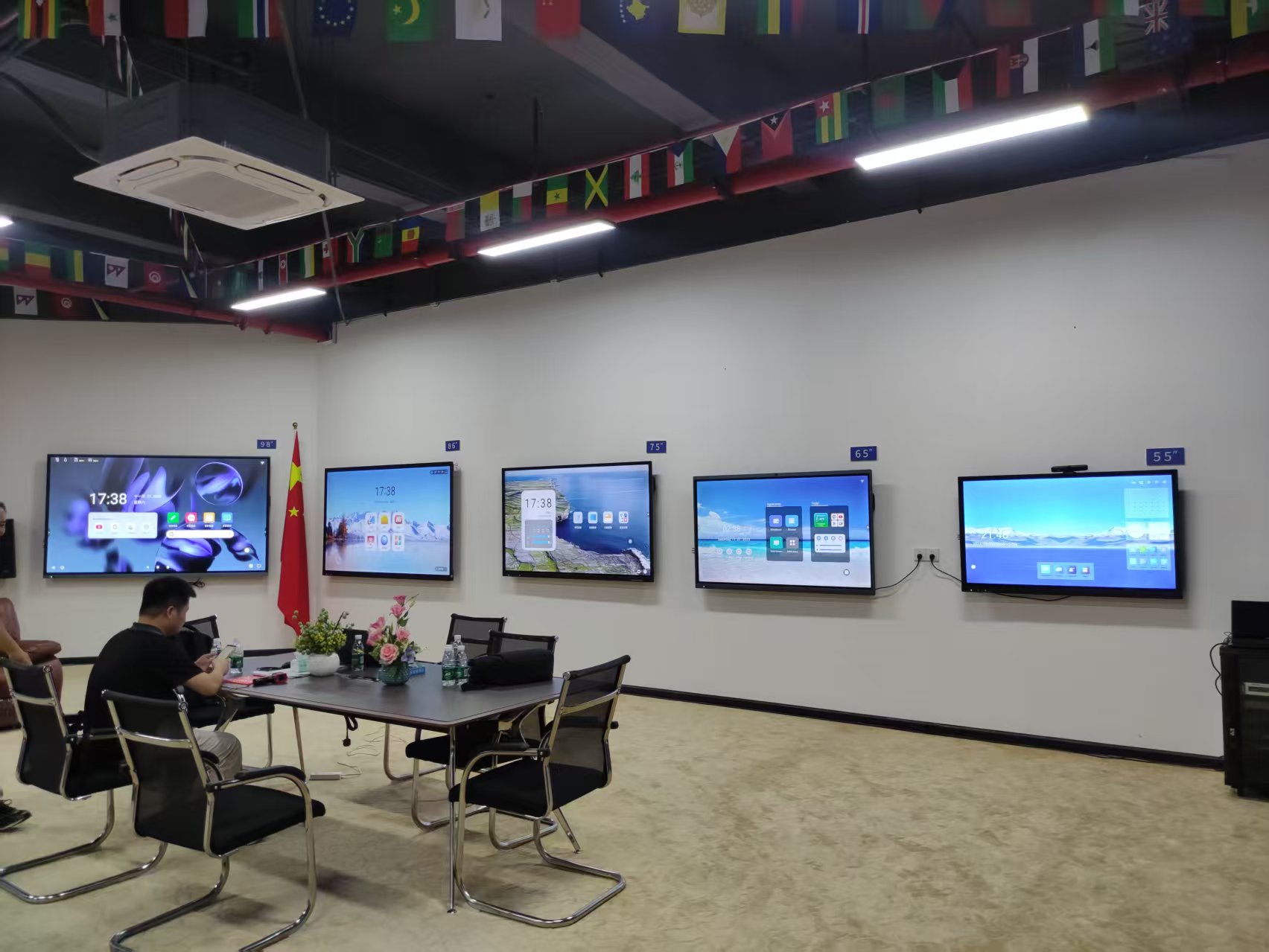
Advanced Technology for Seamless Collaboration
TORUI Interactive Whiteboard combines high-precision touch technology, ultra-HD display, and intuitive software integration to create an all-in-one digital collaboration platform. Built with advanced infrared or capacitive touch systems, TORUI boards support up to 20-point touch interaction, allowing multiple users to write, draw, and edit simultaneously. The smooth, lag-free response ensures a natural writing experience similar to a traditional whiteboard but with the added power of digital flexibility.
Equipped with 4K resolution and anti-glare glass, the display delivers vivid and eye-friendly visuals in all lighting conditions. The built-in Android or dual OS system (Android + Windows) provides users with instant access to whiteboard tools, screen sharing, document editing, and multimedia playback—without the need for external devices.
Smart Education with TORUI
For schools and universities, TORUI’s interactive whiteboards are transforming traditional classrooms into smart learning environments. Teachers can easily annotate over lesson materials, display 3D models, and connect with students’ tablets or laptops for real-time participation. The boards are compatible with mainstream educational platforms and applications, supporting hybrid and remote learning models.
TORUI’s software suite enables interactive lessons with features such as screen recording, instant feedback, and cloud-based lesson storage. Students benefit from engaging visual content and collaborative exercises that enhance learning outcomes. Whether used in K–12 classrooms or higher education, TORUI ensures technology serves both teaching and creativity.
Boosting Corporate Productivity
In business settings, TORUI Interactive Whiteboard becomes the hub for modern meeting rooms. With built-in video conferencing compatibility (Zoom, Teams, Google Meet, etc.), users can brainstorm ideas, annotate presentations, and collaborate across global teams in real time. Wireless screen mirroring allows participants to share content from laptops and mobile devices instantly, removing barriers between physical and virtual attendees.
The intuitive user interface, powerful processors, and multiple connectivity options (HDMI, USB, Type-C, LAN, Wi-Fi, Bluetooth) make TORUI’s boards ideal for corporate presentations, project management sessions, and creative design workshops.
Quality, Reliability, and Customization
TORUI focuses on manufacturing excellence and strict quality control. Each board undergoes comprehensive testing—from touch accuracy and color calibration to durability—ensuring long-term stability for high-traffic environments like classrooms and boardrooms.
The company offers multiple size options (55”, 65”, 75”, 86”, 98”, and 110”) and customizable configurations to meet diverse customer needs. With scalable production capacity, TORUI can efficiently fulfill bulk orders for distributors and educational institutions worldwide.
Conclusion
TORUI Interactive Whiteboard delivers more than just a display—it creates a smarter, more connected communication experience. Whether applied in schools, universities, or enterprises, TORUI provides the tools to inspire creativity, enhance engagement, and simplify collaboration. Backed by strong R&D, reliable manufacturing, and a global service network, TORUI continues to lead the way in the evolution of interactive technology.
Smart Board for Teaching: Enhancing Learning Through Interactive Technology
Top Features to Consider When Choosing an Interactive Whiteboard
Related Article

Choosing the right interactive whiteboard size is an important decision for distributors, wholesalers, and education technology suppliers. The 65-inch, 75-inch, and 86-inch interactive whiteboards are popular options for classrooms, meeting rooms, training centers, and commercial projects.
65 vs 75 vs 86-Inch Interactive Whiteboard: Which Model Should Distributors Choose?

Choosing the right interactive whiteboard manufacturer in China is an important decision for distributors, wholesalers, education technology suppliers, and system integrators. The right manufacturing partner can help businesses improve product quality, maintain competitive pricing, customize products for local markets, and build a sustainable distribution business.
Who Are the Best Interactive Whiteboard Manufacturers in China for B2B Distributors and Wholesalers?

Choosing an interactive whiteboard involves more than comparing screen sizes and prices. For schools, businesses, distributors, wholesalers, and system integrators, understanding the technical specifications is essential to selecting a reliable product that meets different application requirements.
Interactive Whiteboard Technical Specifications Explained: A Complete Guide to CPU, RAM, Storage, Touch, Panel, OPS, Camera and Connectivity

Choosing an interactive whiteboard for a school, meeting room, training center, government organization or commercial project requires more than comparing screen size and price. The most important specifications include display resolution, brightness, touch technology, operating system, processor, memory, storage, OPS compatibility, camera and microphone performance, connectivity, durability and after-sales support.
How to Choose an Interactive Whiteboard: A Technical Guide to Display, Touch, OS, OPS, Camera and Connectivity