
TORUI Interactive Whiteboard Specification Analysis

The TORUI interactive whiteboard delivers advanced display performance, intuitive touch interaction, and flexible system options for modern classrooms and corporate meeting rooms. Designed for education and enterprise collaboration, it integrates 4K resolution, multi-touch capability, and Android + Windows dual operating systems, providing a complete digital workspace for interactive communication.
1. Display and Visual Performance
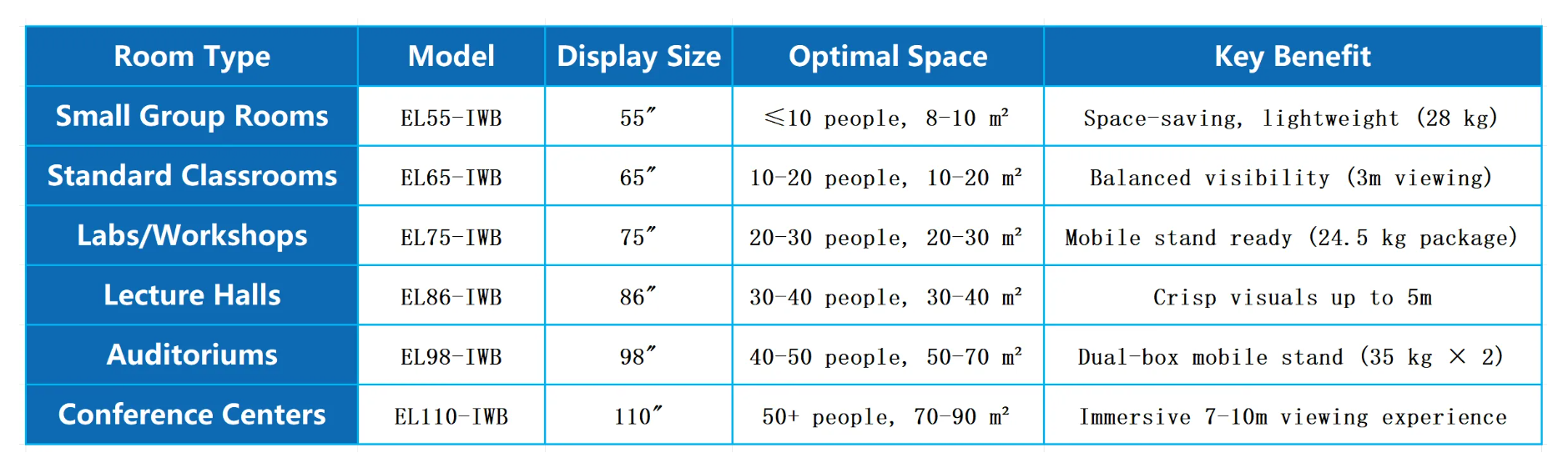
TORUI offers multiple screen sizes, including 65", 75", 86", and 98", all supporting 4K Ultra HD (3840 × 2160) resolution. The high brightness and vivid color ensure sharp visibility even in well-lit environments. The anti-glare tempered glass surface reduces reflections while maintaining smooth writing performance.
Its 178° wide viewing angle and consistent color reproduction make it suitable for large classrooms or conference halls. The LED backlight panel guarantees energy efficiency and long lifespan, ensuring consistent image quality for years of use.
2. Touch Technology and Writing Experience
Equipped with infrared or capacitive multi-touch technology, TORUI supports up to 20–40 touch points for multi-user collaboration. The ultra-fast response time under 8ms ensures precise handwriting, drawing, and gesture control.
Users can write with a stylus or finger, and the intelligent recognition system automatically distinguishes between writing, erasing, and zooming gestures. These features make classroom teaching, brainstorming, and project presentations more engaging and efficient.
3. Dual System Flexibility: Android + OPS
The TORUI interactive whiteboard supports dual operating systems — Android and Windows.
-
Android System: Ideal for quick start-up, wireless screen sharing, and whiteboard applications. It typically includes 4–8GB RAM and 32–128GB storage, suitable for routine teaching and presentation tasks.
-
OPS Computer (Windows): An optional plug-in module featuring Intel i5/i7 processors, 8–16GB RAM, and SSD storage, allowing users to run full desktop applications like Microsoft Office, Zoom, or Teams seamlessly.
This hybrid setup gives institutions the flexibility to use Android for basic tasks and Windows for advanced business or educational applications.
4. Connectivity and Expansion
TORUI provides a comprehensive range of connectivity options including HDMI, VGA, USB-C, USB 3.0, RJ45, Audio In/Out, and RS232. Built-in Wi-Fi and Bluetooth enable wireless device pairing and screen casting.
It supports popular mirroring protocols like AirPlay, Miracast, and EShare, allowing users to project content from smartphones, tablets, and laptops with a single click. This eliminates cable clutter and promotes efficient collaboration in modern classrooms and offices.
5. Audio, Camera, and Collaboration Tools
Many TORUI models include integrated 2×15W stereo speakers that deliver high-quality sound. Optional 4K cameras and 8-array microphones provide crystal-clear communication during hybrid meetings and remote learning sessions.
These components make the whiteboard ideal for Zoom, Microsoft Teams, and Google Meet, ensuring seamless online collaboration and presentations.
6. Software and User Experience
TORUI’s built-in software supports interactive features like multi-user annotation, shape recognition, screenshot capture, cloud storage integration, and one-click file export (PDF/PPT).
The interface is designed with simplicity in mind, allowing teachers and professionals to operate without extensive training. Regular OTA updates keep the system secure and up to date.
7. Quality Assurance and Certifications
TORUI’s products are manufactured under ISO9001-certified quality systems and comply with CE, FCC, and RoHS international safety standards. These certifications assure long-term reliability and safety for global users.
TORUI also provides warranty coverage, spare parts supply, and after-sales technical support, which are essential for institutional and corporate procurement.
8. Conclusion
The TORUI interactive whiteboard stands out as a cost-effective and high-performance solution for digital classrooms, smart offices, and hybrid collaboration environments. It combines 4K visual quality, multi-touch precision, dual-system flexibility, and comprehensive connectivity, offering excellent value for organizations seeking to upgrade from traditional projection systems.
For buyers looking for a reliable and scalable interactive display, TORUI provides a competitive alternative to premium brands — ensuring a balance of performance, functionality, and affordability.
Interactive Flat Panels: What They Are & How to Choose the Right One — 2025 Guide
Smart Board for Classroom: Transforming Modern Education
Related Article



