
Unlock the Potential of a 55-inch Interactive Whiteboard
author: toruitech
2025-06-23

In recent years, the 55-inch interactive whiteboard has become a game-changing tool in education, business, and collaborative environments. This versatile device, which combines traditional whiteboards, touchscreens, and advanced digital capabilities, is revolutionizing the way we learn, communicate, and collaborate. With its intuitive interface, sleek design, and versatile features, the 55-inch interactive whiteboard is no longer just a tool, but a catalyst for increased efficiency and creativity.
The Importance of 55-inch Size
When it comes to interactive whiteboards, size matters. A 55-inch screen strikes the perfect balance between ease of use and convenience. It’s large enough to clearly display complex visuals, charts, graphs, and multimedia content, yet compact enough to fit into a classroom, small conference room, or collaborative space. This screen size ensures clear visibility for a group of participants without compromising resolution or clarity. Whether in a school science lab or a corporate strategy meeting, the 55-inch size provides a practical solution for a variety of environments.
In addition, the screen size is perfect for multiple people to interact with the whiteboard at the same time, enabling collaboration, brainstorming, and teamwork. This size is ideal for close interaction in small to medium-sized groups, especially when participants need to collaborate in real time to solve problems or come up with ideas.
Features that change the interactive experience
The core appeal of a 55-inch interactive whiteboard is its functionality, which makes it more than just a digital display. Touch functionality enables intuitive interaction with the screen. Users can write, draw, erase, scale, or manipulate objects directly on the whiteboard using a fingertip or stylus—just as on a traditional whiteboard—but with greater precision and flexibility.
Many interactive whiteboards come integrated with advanced software that significantly improves productivity. From real-time document annotation to instant file sharing with connected devices, the technology integrates seamlessly with cloud platforms such as Google Workspace or Microsoft Teams. This connectivity supports remote collaboration, allowing users in different locations to simultaneously view and interact with the same whiteboard content. These features are indispensable in today's hybrid work and learning environments.
The screens themselves often have HD or even 4K resolutions, ensuring that images, text, and videos are clear and easy to read no matter where you are in the room. Additional features such as advanced audio systems and built-in cameras further enhance the experience, especially for remote collaboration or virtual presentations.
Other benefits include the ability to save, share, and review whiteboard sessions. Teachers can save lessons; business leaders can save brainstorming sessions or strategic plans for future reference. These features streamline workflows and eliminate the uncertainty of manually taking notes or losing important information after a meeting.
Applications Across Major Industries
1. Education
Interactive whiteboards are transforming education by making learning immersive and engaging. The 55-inch model is ideal for modern classrooms, where digital and interactive teaching methods are increasingly becoming the norm. Teachers can use interactive whiteboards to present multimedia handouts, annotate diagrams, or dynamically demonstrate concepts.
For students, hands-on learning through whiteboards can promote greater engagement and collaboration. Group projects often benefit from direct interaction on the screen, as students can outline and adjust ideas in real time. The technology also meets the needs of remote education, where teachers can share interactive lessons with students online, ensuring that learning continues even during an epidemic or other disruptions.
2. Business and corporate environments
In the corporate world, the 55-inch interactive whiteboard is a powerful tool for meetings, presentations, and problem-solving sessions. Its user-friendly features make it easier for teams to plan projects, discuss strategies, or collaborate to analyze data. Screen mirroring and integration with devices such as laptops or tablets make it easy for presenters and participants to share content without complicated setup.
Remote work and hybrid meetings benefit greatly from whiteboards with video conferencing capabilities, which enable colleagues in different locations to interact seamlessly. By bridging the gap between physical and virtual collaboration, the device ensures that productivity and teamwork are not hindered.
3. Healthcare
The healthcare industry has also begun to adopt the capabilities of interactive whiteboards. Healthcare professionals use them for patient education and to display interactive visuals such as anatomical diagrams or examination results. In medical team meetings, doctors and researchers can jointly analyze data and brainstorm solutions for complex cases.
4. Creative Industries
Interactive whiteboards are equally useful in creative industries such as design, media, and advertising. During workshops or creative sessions, teams can sketch ideas, edit visuals in real time, or collaborate to create prototypes. This technology inspires innovation by providing new ways to visualize and share concepts.
The Future of Interactive Whiteboards
As technology evolves, interactive whiteboards are becoming more intuitive and personalized. Future iterations of the 55-inch model may incorporate artificial intelligence (AI) to anticipate user needs, such as recommending content or automating tasks like saving and categorizing whiteboard sessions. Enhanced gesture recognition allows for touchless control, while improved energy efficiency and portability promise wider adoption in homes, small businesses, and non-traditional locations.
In addition, as augmented reality (AR) and virtual reality (VR) continue to advance, the fusion of these technologies with interactive whiteboards will redefine collaboration and learning. Imagine a classroom where students can explore simulated environments directly on the whiteboard, or a meeting where projected 3D models allow for hands-on brainstorming.
Conclusion
The 55-inch interactive whiteboard is more than just a tool; it’s an enabler of communication, learning, and collaboration across industries. Its size, interactivity, and smart features make it a must-have for modern classrooms, offices, and creative spaces. As technology advances, interactive whiteboards will become more versatile and able to meet the diverse needs of today’s connected world. By embracing this innovation, we’ll unlock new possibilities for productivity, creativity, and engagement.
Smart interactive whiteboard: a tool to improve teaching and meeting efficiency
Smart interactive whiteboard: analysis of the advantages of various sizes
Related Article
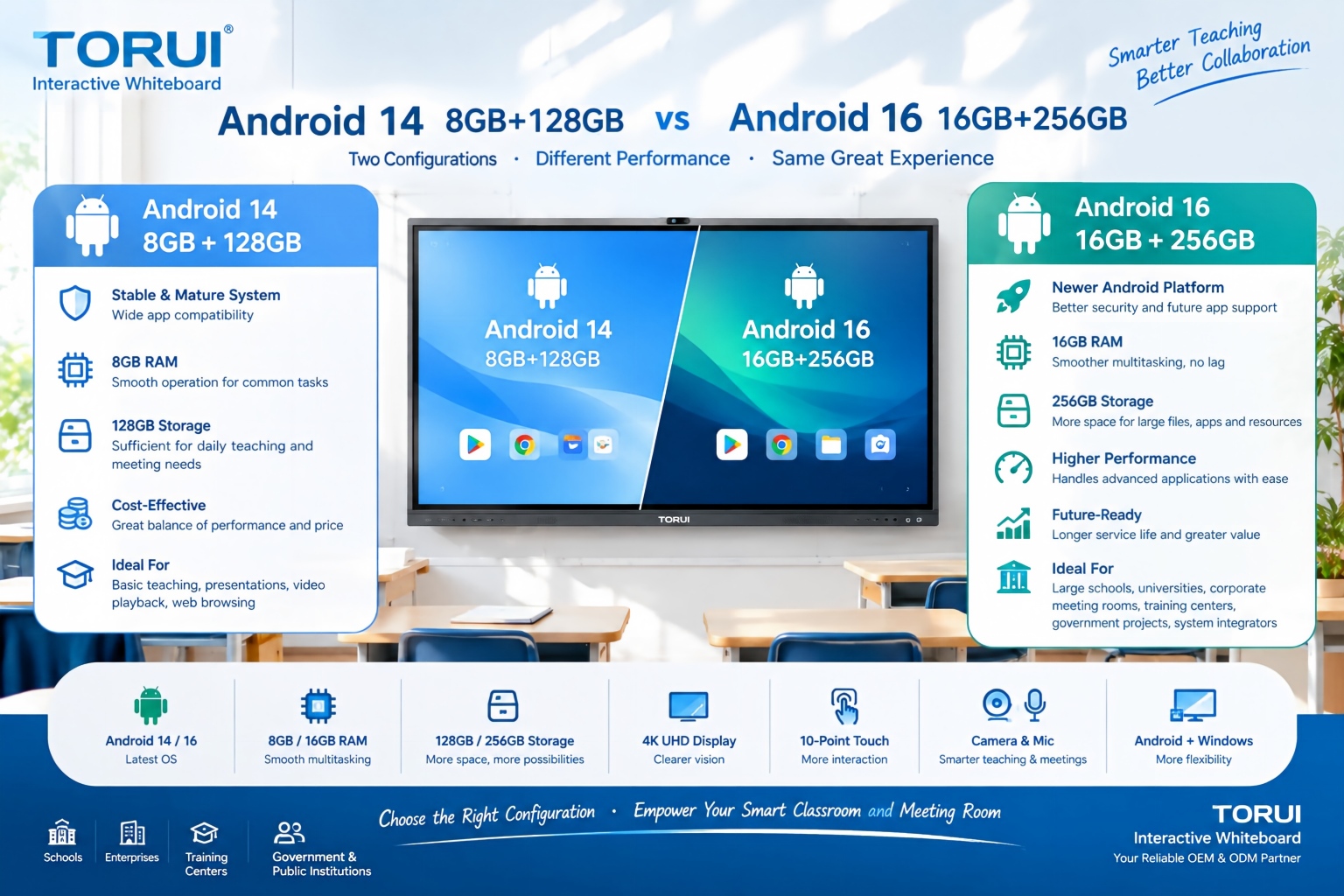
When choosing an interactive whiteboard for a school, training center, meeting room, or commercial project, the Android version and hardware configuration can significantly affect user experience. Two common configurations are Android 14 with 8GB RAM and 128GB storage and Android 16 with 16GB RAM and 256GB storage.
Android 14 8GB+128GB vs Android 16 16GB+256GB: Which Interactive Whiteboard Is Better?

Buying an interactive whiteboard is not simply about choosing the right screen size, resolution, or operating system. For B2B buyers, distributors, system integrators, schools, and corporate procurement teams, quality control is one of the most important factors affecting long-term reliability, user experience, warranty costs, and customer satisfaction.
Interactive Whiteboard Quality Control: What Should Buyers Check?
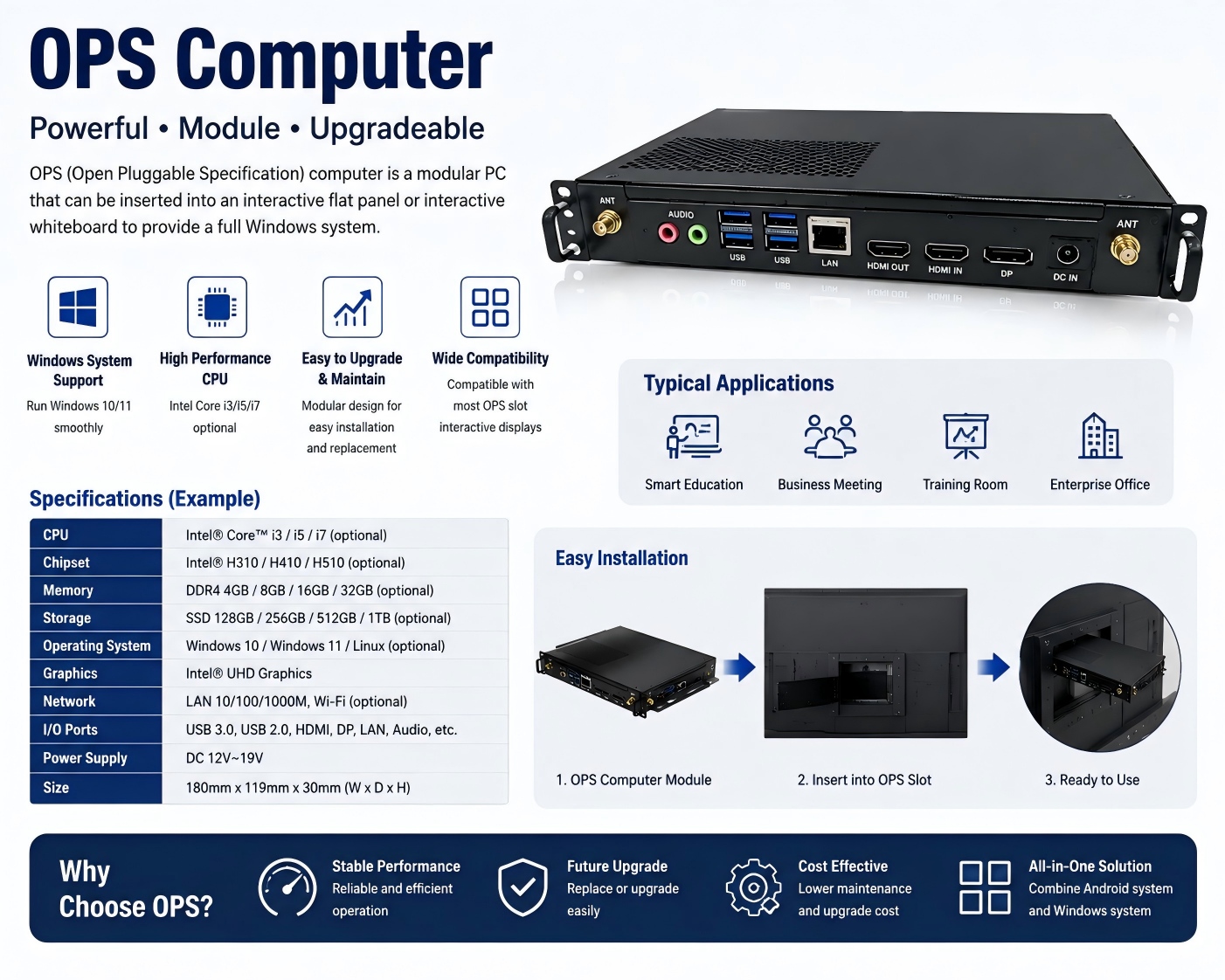
An OPS computer for an interactive whiteboard is a modular plug-in PC designed to add Windows-based computing power to an interactive display. OPS stands for Open Pluggable Specification, a standardized form factor originally developed for commercial interactive displays.
What Is an OPS Computer for Interactive Whiteboards?

Choosing the right chipset is an important decision when sourcing an interactive whiteboard for schools, conference rooms, training centers, government projects, or commercial applications. Among Rockchip platforms, RK3588 and RK3576 are two powerful options for modern Android interactive displays.
RK3588 vs RK3576: Which Chip Is Better for Interactive Whiteboards?